
صفحه بندی به صورت ajax همراه با جستجو و فیلتر در Asp.net MVC5
شنبه 7 مرداد 1396در این مقاله قصد داریم یک View ایجاد کنیم که محصولات را به صورت ajax بتوانیم جستجو و فیلتر کنیم و همچنین از صفحه بندی استفاده کنیم .
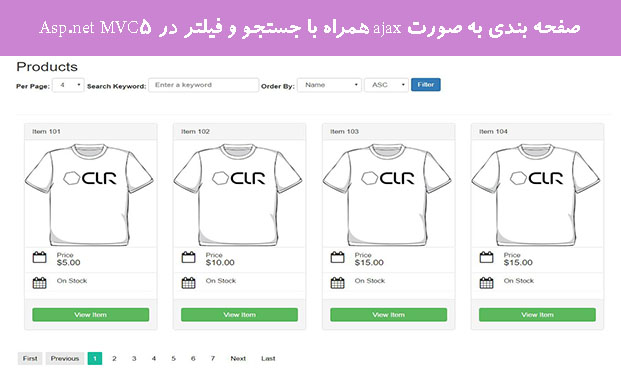
شاید یکی از مشکلاتی که برای شما هم پیش آمده باشد صفحه بندی به صورت ajax همراه با جستجو و فیلتر باشد .
در این مقاله قصد داریم با استفاده از ajax این کار را به ساده ترین راه ممکن انجام دهیم .
برای این منظور یک پروژه از نوع MVC ایجاد می کنیم .
EntityFrameWork را از طریق Nuget در پروژه نصب می کنیم .
کلاس Product را در پوشه Model ایجاد می کنیم و کد های زیر را در آن قرار می دهیم .
  public class Product
    {
        public int id { get; set; }
        public string name { get; set; }
        [AllowHtml]
        public string content { get; set; }
        public string excerpt { get; set; }
        public DateTime? date { get; set; }
        public decimal price { get; set; }
        public int quantity { get; set; }
        public int status { get; set; }
        public int author { get; set; }
        public string images { get; set; }
        public string featured_image { get; set; }
    }

    public class ProductDBContext : DbContext
    {
        public ProductDBContext()
            : base("DefaultConnection")
        {
        }
        public DbSet<Product> Products { get; set; }
    }
در کدهای بالا بعد از تعریف DbContext را نیز بعد از کلاس Product انجام دادیم .
در sql server managment یک دیتابیس به اسم TestPage ایجاد می کنیم .
این کانکشن استرینگ را به فایل Web.config در پروژه اضافه می کنیم .
<connectionStrings>
    <add name="DefaultConnection" connectionString="Data Source=.;Initial Catalog=TestPage;Integrated Security=True;MultipleActiveResultSets=true" providerName="System.Data.SqlClient" />

  </connectionStrings>
حالا وارد پروژه شده از سربرگ Toolsمنوی NuGet Package Manager-> Package Manager Console را انتخاب می کنیم .
ابتدا دستور Enable-migrations رو می نوسیم و Enter را می زنیم .
بعد از آن Add-migration MyDb
و بعد از آن Update-database
حالا می توانیم از طریق sql server managment وارد جدول Product شده و تعدادی رکورد وارد کنیم .
بعد از ساخت دیتابیس نوبت به ساخت صفحه می شود .
روی پوشه Controllers کلیک راست می کنیم و New Scaffolded Item را می زنیم .
گزینه ی MVC5 controller with views,using EntityFramework را انتخاب می کنیم .
در صفحه بعدی که باز می شود .
Model class : Product
Data context class : ProductDBContext
نام کنترلر هم ProductsController
Add را می زنیم تا کنترلر و ویو های متناظر آن ساخته شود .
وارد کنترلر ساخته شده می شویم و به جای کدهای Index کدهای پایین را کپی می کنیم.
 [HttpGet]
        public ActionResult Index()
        {
            /* No logic required here, let's just render the view */
            return View();
        }

        [HttpPost]
        public string Index(FormCollection collection)
        {
            /* Setup default variables that we are going to populate later */
            var pag_content = "";
            var pag_navigation = "";

            /* Define all posted data coming from the view. */
            int page = Convert.ToInt32(collection["data[page]"]); /* Page we are currently at */
            string sort = collection["data[sort]"] == "ASC" ? "asc" : "desc"; /* Order of our sort (DESC or ASC) */
            string name = collection["data[name]"]; /* Name of the column name we want to sort */
            int max = Convert.ToInt32(collection["data[max]"]); /* Number of items to display per page */
            string search = collection["data[search]"]; /* Keyword provided on our search box */

            int cur_page = page;
            page -= 1;
            int per_page = max > 1 ? max : 16;
            bool previous_btn = true;
            bool next_btn = true;
            bool first_btn = true;
            bool last_btn = true;
            int start = page * per_page;

            var all_items_query= db.Products.Where(x => x.id != 0).OrderByDescending(p => p.name)
                .Skip(start)
                .Take(per_page);
            if (sort == "desc")
            {
                if (name == "name")
                {


                /* Let's build the query using available data that we received form the front-end via ajax */
                all_items_query = db.Products.Where(x => x.id != 0).OrderByDescending(p=>p.name)
                    .Skip(start)
                    .Take(per_page); /* Get only the products to display. */
                }else if (name == "price")
                {
                    /* Let's build the query using available data that we received form the front-end via ajax */
                    all_items_query = db.Products.Where(x => x.id != 0).OrderByDescending(p => p.price)
                        .Skip(start)
                        .Take(per_page); /* Get only the products to display. */
                }
                else
                {
                    /* Let's build the query using available data that we received form the front-end via ajax */
                    all_items_query = db.Products.Where(x => x.id != 0).OrderByDescending(p => p.date)
                        .Skip(start)
                        .Take(per_page); /* Get only the products to display. */
                }
            }
            else
            {
                if (name == "name")
                {


                    /* Let's build the query using available data that we received form the front-end via ajax */
                    all_items_query = db.Products.Where(x => x.id != 0).OrderBy(p => p.name)
                        .Skip(start)
                        .Take(per_page); /* Get only the products to display. */
                }
                else if (name == "price")
                {
                    /* Let's build the query using available data that we received form the front-end via ajax */
                    all_items_query = db.Products.Where(x => x.id != 0).OrderBy(p => p.price)
                        .Skip(start)
                        .Take(per_page); /* Get only the products to display. */
                }
                else
                {
                    /* Let's build the query using available data that we received form the front-end via ajax */
                    all_items_query = db.Products.Where(x => x.id != 0).OrderByDescending(p => p.date)
                        .Skip(start)
                        .Take(per_page); /* Get only the products to display. */
                }
            }


            /* Get total items in our database */
            var count_query = db.Products
                .Where(x => x.id != 0); /* Get total products count. */

            /* If there is a search keyword, we search through the database for possible matches*/
            if (search != "")
            {
                /* The "Contains" method matches records using the LIKE %keyword% format */
                all_items_query = all_items_query.Where(x =>
                    x.name.Contains(search) ||
                    x.content.Contains(search) ||
                    x.excerpt.Contains(search)
                );
                count_query = count_query.Where(x =>
                    x.name.Contains(search) ||
                    x.content.Contains(search) ||
                    x.excerpt.Contains(search)
                );
            }

            /* We now fetch the data from our database */
            var all_items = all_items_query.ToList();
            int count = count_query.Count();

            if (count > 0)
            {
                /* Loop through each item to create views */
                foreach (var item in all_items)
                {
                    pag_content += "<div class='col-sm-3 item-" + item.id + "'>" +
                                   "<div class='panel panel-default'>" +
                                   "<div class='panel-heading item-name'>" +
                                   item.name +
                                   "</div>" +
                                   "<div class='panel -body p-0 p-b'>" +
                                   "<a href='/Products/Details/" + item.id + "'><img src='/Content/Images/" + "dummy-shirt.png" + "' width='100%' class='img-responsive item-featured' /></a>" +
                                   "<div class='list-group m-0'>" +
                                   "<div class='list-group-item b-0 b-t'>" +
                                   "<i class='fa fa-calendar-o fa-2x pull-left ml-r'></i>" +
                                   "<p class='list-group-item-text'>Price</p>" +
                                   "<h4 class='list-group-item-heading'>$<span class='item-price'>" + item.price + "</span></h4>" +
                                   "</div>" +
                                   "<div class='list-group-item b-0 b-t'>" +
                                   "<i class='fa fa-calendar fa-2x pull-left ml-r'></i>" +
                                   "<p class='list-group-item-text'>On Stock</p>" +
                                   "<h4 class='list-group-item-heading item-stock'>" + "" + "</h4>" +
                                   "</div>" +
                                   "</div>" +
                                   "</div>" +
                                   "<div class='panel-footer'>" +
                                   "</p><a href='/Products/Details/" + item.id + "' class='btn btn-success btn-block'>View Item</a></p>" +
                                   "</div>" +
                                   "</div>" +
                                   "</div>";
                }
            }
            else
            {
                /* Show a message if no items were found */
                pag_content += "<p class='p-d bg-danger'>No items found</p>";
            }

            pag_content = pag_content + "<br class = 'clear' />";

            /* Bellow is the navigation logic and view */
            decimal nop_ceil = Decimal.Divide(count, per_page);
            int no_of_paginations = Convert.ToInt32(Math.Ceiling(nop_ceil));

            var start_loop = 1;
            var end_loop = no_of_paginations;

            if (cur_page >= 7)
            {
                start_loop = cur_page - 3;
                if (no_of_paginations > cur_page + 3)
                {
                    end_loop = cur_page + 3;
                }
                else if (cur_page <= no_of_paginations && cur_page > no_of_paginations - 6)
                {
                    start_loop = no_of_paginations - 6;
                    end_loop = no_of_paginations;
                }
            }
            else
            {
                if (no_of_paginations > 7)
                {
                    end_loop = 7;
                }
            }

            pag_navigation += "<ul>";

            if (first_btn && cur_page > 1)
            {
                pag_navigation += "<li p='1' class='active'>First</li>";
            }
            else if (first_btn)
            {
                pag_navigation += "<li p='1' class='inactive'>First</li>";
            }

            if (previous_btn && cur_page > 1)
            {
                var pre = cur_page - 1;
                pag_navigation += "<li p='" + pre + "' class='active'>Previous</li>";
            }
            else if (previous_btn)
            {
                pag_navigation += "<li class='inactive'>Previous</li>";
            }

            for (int i = start_loop; i <= end_loop; i++)
            {

                if (cur_page == i)
                    pag_navigation += "<li p='" + i + "' class = 'selected' >" + i + "</li>";
                else
                    pag_navigation += "<li p='" + i + "' class='active'>" + i + "</li>";
            }

            if (next_btn && cur_page < no_of_paginations)
            {
                var nex = cur_page + 1;
                pag_navigation += "<li p='" + nex + "' class='active'>Next</li>";
            }
            else if (next_btn)
            {
                pag_navigation += "<li class='inactive'>Next</li>";
            }

            if (last_btn && cur_page < no_of_paginations)
            {
                pag_navigation += "<li p='" + no_of_paginations + "' class='active'>Last</li>";
            }
            else if (last_btn)
            {
                pag_navigation += "<li p='" + no_of_paginations + "' class='inactive'>Last</li>";
            }

            pag_navigation = pag_navigation + "</ul>";

            /* Lets put our variables in a dictionary */
            var response = new Dictionary<string, string> {
                { "content", pag_content },
                { "navigation", pag_navigation }
            };

            /* Then we return the Dictionary in json format to our front-end */
            string json = new JavaScriptSerializer().Serialize(response);
            return json;
        }
به پوشه Views -> Products می رویم و فایل Index.cshtml را باز می کنیم و کدهای زیر را جایگزین آن می کنیم.
@model IEnumerable<WebApplication1.Models.Product>

@{
    ViewBag.Title = "Index";
    Layout = "~/Views/Shared/_Layout.cshtml";
}

<h2>Products</h2>

<div class="products-view-all">
    <form class="post-list">
        <input type="hidden" value="">
    </form>
    <div class="clearfix">
        <article class="navbar-form navbar-left p-0 m-0 ml-b">
            <div class="form-group">
                <label>Per Page: </label>
                <select class="form-control post_max m-b">
                    <option value="4">4</option>
                    <option value="8">8</option>
                    <option value="16">16</option>
                </select>
            </div>
            <label>
                Search Keyword:
                <input type="text" placeholder="Enter a keyword" class="form-control post_search_text m-b">
            </label>
            <div class="form-group">
                <label>Order By: </label>
                <select class="form-control post_name m-b">
                    <option value="name">Name</option>
                    <option value="price">Price</option>
                    <option value="date">Date Posted</option>
                </select>
                <select class="form-control post_sort m-b">
                    <option value="ASC">ASC</option>
                    <option value="DESC">DESC</option>
                </select>
            </div>
            <input type="submit" value="Filter" class="btn btn-primary post_search_submit m-b">
        </article>
    </div>
    <hr>
    <div class="clearfix">
        <div class="pagination-container clearfix"><br class="clear"></div>
        <div class="pagination-nav"></div>
    </div>
</div>
روی پوشه Scripts کلیک راست می کنیم گزینه Add -> JavaScriptFile یک فایل از نوع JavaScript به نام App.js ایجاد می کنیم و محتوای آن را ، محتوای زیر قرار می دهیم .
/**
 * App Class
 *
 * @author      Carl Victor Fontanos
 * @author_url  www.carlofontanos.com
 *
 */

/**
 * Setup a App namespace to prevent JS conflicts.
 */
var app = {

    Posts: function () {

        /**
         * This method contains the list of functions that needs to be loaded
         * when the "Posts" object is instantiated.
         *
         */
        this.init = function () {
            this.get_all_items_pagination();
        }

        /**
         * Load front-end items pagination.
         */
        this.get_all_items_pagination = function () {

            _this = this;

            /* Check if our hidden form input is not empty, meaning it's not the first time viewing the page. */
            if ($('form.post-list input').val()) {
                /* Submit hidden form input value to load previous page number */
                data = JSON.parse($('form.post-list input').val());
                _this.ajax_get_all_items_pagination(data.page, data.name, data.sort);
            } else {
                /* Load first page */
                _this.ajax_get_all_items_pagination(1, $('.post_name').val(), $('.post_sort').val());
            }

            /* Search */
            $('body').on('click', '.post_search_submit', function () {
                _this.ajax_get_all_items_pagination(1, $('.post_name').val(), $('.post_sort').val());
            });
            /* Search when Enter Key is triggered */
            $(".post_search_text").keyup(function (e) {
                if (e.keyCode == 13) {
                    _this.ajax_get_all_items_pagination(1, $('.post_name').val(), $('.post_sort').val());
                }
            });

            /* Pagination Clicks   */
            $('body').on('click', '.pagination-nav li.active', function () {
                var page = $(this).attr('p');
                _this.ajax_get_all_items_pagination(page, $('.post_name').val(), $('.post_sort').val());
            });
        }

        /**
         * AJAX front-end items pagination.
         */
        this.ajax_get_all_items_pagination = function (page, order_by_name, order_by_sort) {

            if ($(".pagination-container").length > 0 && $('.products-view-all').length > 0) {
                $(".pagination-container").html('<img src="/Content/Images/loading.gif" class="ml-tb" />');

                var post_data = {
                    page: page,
                    search: $('.post_search_text').val(),
                    name: order_by_name,
                    sort: order_by_sort,
                    max: $('.post_max').val(),
                };

                $('form.post-list input').val(JSON.stringify(post_data));

                var data = {
                    action: 'get-all-products',
                    data: JSON.parse($('form.post-list input').val())
                };

                $.ajax({
                    url: '/Products/Index',
                    type: 'POST',
                    data: data,
                    success: function (response) {
                        response = JSON.parse(response);

                        if ($(".pagination-container").html(response.content)) {
                            $('.pagination-nav').html(response.navigation);
                            $('.table-post-list th').each(function () {
                                /* Append the button indicator */
                                $(this).find('span.glyphicon').remove();
                                if ($(this).hasClass('active')) {
                                    if (JSON.parse($('form.post-list input').val()).th_sort == 'DESC') {
                                        $(this).append(' <span class="glyphicon glyphicon-chevron-down pull-right"></span>');
                                    } else {
                                        $(this).append(' <span class="glyphicon glyphicon-chevron-up pull-right"></span>');
                                    }
                                }
                            });
                        }
                    }
                });
            }
        }
    }
}

/**
 * When the document has been loaded...
 *
 */
jQuery(document).ready(function () {

    posts = new app.Posts(); /* Instantiate the Posts Class */
    posts.init(); /* Load Posts class methods */

});
رفرنس آن را به فایل _Layout در قسمت اسکریپت ها اضافه می کنیم .
وارد پوشه Content می شویم و یک پوشه به نام Images اضافه می کنیم و یک عکس به نام dummy-shirt.png و loading.gif به آن اضافه می کنیم . ( می توانید از اینترنت دانلود کنید )
وارد فایل Site.css می شویم و کدهای زیر را به آن اضافه می کنیم .
/* Pagination Styles */
.pagination-nav { margin: 30px 0 20px 0; }
.pagination-nav ul {margin: 0; padding: 0;}
.pagination-nav ul li {display: inline-block; margin: 3px; padding: 6px 10px; background: #FFF; color: black; border-radius: 2px; }
.pagination-nav ul li.active:hover {cursor: pointer; background: #18bc9c; color: white; }
.pagination-nav ul li.inactive {background: #e8e8e8;}
.pagination-nav ul li.selected {background: #18bc9c; color: white;}
پروژه آماده است و شما می توانید آن را اجرا کنید .
امیدوارم که از این مقاله استفاده کنید . آموزش asp.net mvc
با تشکر محسن سلمانی

- ASP.net MVC
- 5k بازدید
- 11 تشکر