
سورس بازی jetBoy در اندروید
سه شنبه 2 خرداد 1396در این مقاله قصد داریم برای شما یک سورس بازی قرار بدهیم که این سورس بازی در مورد سنسور های حرکتی در اندروید است و به این صورت هست که شما باید یک سفینه فضایی را که در فضا است حرکت دهید و آن را به بالا و پایین هدایت نمایید.
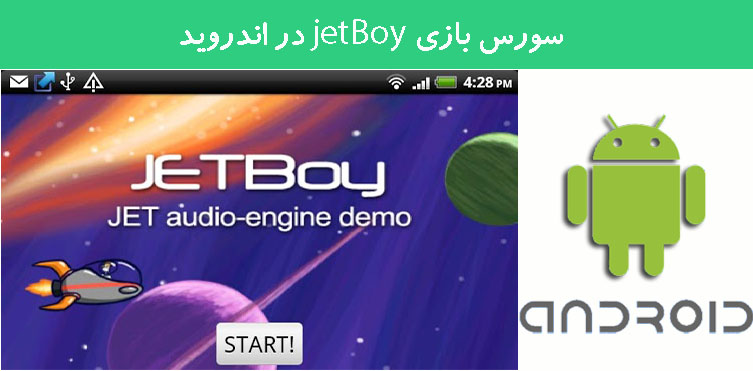
در این سورس دارای یک لایه است که به صورت زیر خواهد بود:
<?xml version="1.0" encoding="utf-8"?>
<FrameLayout xmlns:android="http://schemas.android.com/apk/res/android"
	android:layout_width="match_parent"
	android:layout_height="match_parent">

	<com.example.android.jetboy.JetBoyView android:id="@+id/JetBoyView"
		android:layout_width="match_parent"
		android:layout_height="match_parent" />

	<TextView android:id="@+id/text" android:text="@string/helpText"
		style="@style/helpText" android:visibility="invisible"
		android:layout_width="300px" android:layout_height="300px"
		android:background="#7Fffffff" android:layout_gravity="center" />

	<Button android:id="@+id/Button01" android:text="@string/start"
		style="@style/ButtonText" android:layout_width="wrap_content"
		android:layout_height="wrap_content"
		android:layout_gravity="center_horizontal|bottom" />

	<Button android:id="@+id/Button02" android:text="@string/retry"
		style="@style/ButtonText" android:visibility="invisible"
		android:layout_width="wrap_content"
		android:layout_height="wrap_content"
		android:layout_gravity="center_horizontal|bottom" />

	<TextView android:id="@+id/timer" android:text="@string/timer"
		style="@style/timerText" android:visibility="invisible"
		android:layout_width="wrap_content"
		android:layout_height="wrap_content"
		android:layout_gravity="top|right" android:background="#000000" />
</FrameLayout>
این سورس کلاس های زیادی دارد که ما در اینجا یک کلاس را توضیح می دهیم اگر مشکلی در کد بود در قسمت انجمن اندروید سوال بفرمایید.
import com.example.android.jetboy.JetBoyView.JetBoyThread;
import android.app.Activity;
import android.os.Bundle;
import android.util.Log;
import android.view.KeyEvent;
import android.view.View;
import android.widget.Button;
import android.widget.TextView;

public class JetBoy extends Activity implements View.OnClickListener {

    /** A handle to the thread that's actually running the animation. */
    private JetBoyThread mJetBoyThread;

    /** A handle to the View in which the game is running. */
    private JetBoyView mJetBoyView;

    // the play start button
    private Button mButton;

    // used to hit retry
    private Button mButtonRetry;

    // the window for instructions and such
    private TextView mTextView;

    // game window timer
    private TextView mTimerView;

    /**
     * Required method from parent class
     *
     * @param savedInstanceState - The previous instance of this app
     */
    public void onCreate(Bundle savedInstanceState) {
        super.onCreate(savedInstanceState);

        setContentView(R.layout.main);

        // get handles to the JetView from XML and the JET thread.
        mJetBoyView = (JetBoyView)findViewById(R.id.JetBoyView);
        mJetBoyThread = mJetBoyView.getThread();

        // look up the happy shiny button
        mButton = (Button)findViewById(R.id.Button01);
        mButton.setOnClickListener(this);

        mButtonRetry = (Button)findViewById(R.id.Button02);
        mButtonRetry.setOnClickListener(this);

        // set up handles for instruction text and game timer text
        mTextView = (TextView)findViewById(R.id.text);
        mTimerView = (TextView)findViewById(R.id.timer);

        mJetBoyView.setTimerView(mTimerView);

        mJetBoyView.SetButtonView(mButtonRetry);

        mJetBoyView.SetTextView(mTextView);
    }


    /**
     * Handles component interaction
     *
     * @param v The object which has been clicked
     */
    public void onClick(View v) {
        // this is the first screen
        if (mJetBoyThread.getGameState() == JetBoyThread.STATE_START) {
            mButton.setText("PLAY!");
            mTextView.setVisibility(View.VISIBLE);

            mTextView.setText(R.string.helpText);
            mJetBoyThread.setGameState(JetBoyThread.STATE_PLAY);

        }
        // we have entered game play, now we about to start running
        else if (mJetBoyThread.getGameState() == JetBoyThread.STATE_PLAY) {
            mButton.setVisibility(View.INVISIBLE);
            mTextView.setVisibility(View.INVISIBLE);
            mTimerView.setVisibility(View.VISIBLE);
            mJetBoyThread.setGameState(JetBoyThread.STATE_RUNNING);

        }
        // this is a retry button
        else if (mButtonRetry.equals(v)) {

            mTextView.setText(R.string.helpText);

            mButton.setText("PLAY!");
            mButtonRetry.setVisibility(View.INVISIBLE);
            // mButtonRestart.setVisibility(View.INVISIBLE);

            mTextView.setVisibility(View.VISIBLE);
            mButton.setText("PLAY!");
            mButton.setVisibility(View.VISIBLE);

            mJetBoyThread.setGameState(JetBoyThread.STATE_PLAY);

        } else {
            Log.d("JB VIEW", "unknown click " + v.getId());

            Log.d("JB VIEW", "state is  " + mJetBoyThread.mState);

        }
    }

    /**
     * Standard override to get key-press events.
     */
    @Override
    public boolean onKeyDown(int keyCode, KeyEvent msg) {
        if (keyCode == KeyEvent.KEYCODE_BACK) {
            return super.onKeyDown(keyCode, msg);
        } else {
            return mJetBoyThread.doKeyDown(keyCode, msg);
        }
    }

    /**
     * Standard override for key-up.
     */
    @Override
    public boolean onKeyUp(int keyCode, KeyEvent msg) {
        if (keyCode == KeyEvent.KEYCODE_BACK) {
            return super.onKeyUp(keyCode, msg);
        } else {
            return mJetBoyThread.doKeyUp(keyCode, msg);
        }
    }
}
این کلاس دکمه ها و عکس ها را تعریف کرده است و برای دکمه های بالا و پایین کردن سفینه رویداد نوشته شده است.
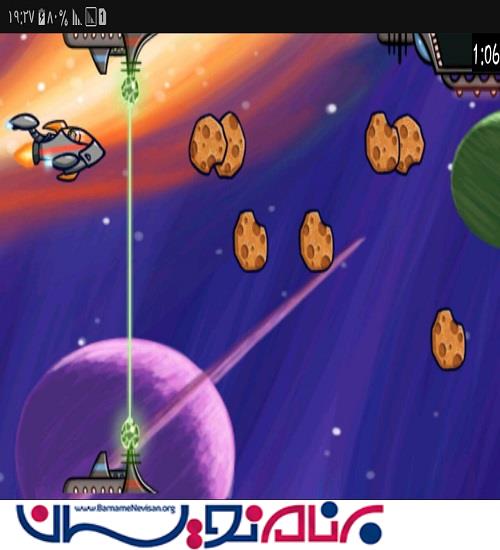
خروجی کار به صورت زیر خواهد بود:

- Android
- 2k بازدید
- 4 تشکر