
سورس بازی NPuzzle در اندروید
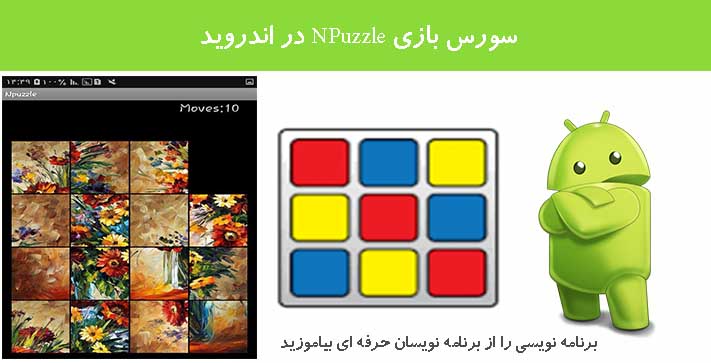
چهارشنبه 16 فروردین 1396در این مقاله می خواهیم یک بازی ساده و زیبا را به نام پازل آموزش دهیم بازی به این صورت است که شما دو تصویر دارید و می توانید این عکس ها را جا به جا نمایید و از راست به چپ و یا از چپ به راست بالا به پایین و یا پایین به بالا حرکت دهید تا تصویر درست در بیاید.
این بازی 7 لایه ی layout دارد
<LinearLayout xmlns:android="http://schemas.android.com/apk/res/android"
		android:id="@+id/scoreView"
       	android:layout_width="wrap_content"
       	android:layout_height="wrap_content"
		android:orientation="horizontal" >

    <TextView
        android:id="@+id/scoreText"
        android:layout_width="wrap_content"
        android:layout_height="wrap_content"
        android:textSize="22dp"
        android:text="@string/scoreText"/>

    <TextView
        android:id="@+id/numMoves"
        android:layout_width="wrap_content"
        android:layout_height="wrap_content"
        android:textSize="22dp"
        android:text="@string/score"/>

</LinearLayout>
این لایه شماره امتیاز و تعداد حرکات پازل را توضیح می دهد.
و 8 تا کلاس جاوا دارد که یکی از آن ها را به اختصار توضیح می دهیم:
مثلا کلاس زیر برای شروع بازی توقف بازی و حرکت تصاویر بین سطر ها و ستون ها است که به صورت زیر است:
/**********************************************
 * GamePlay - the presentation of the game    *
 *                                            *
 * Author: Jacky, Chen                        *
 *                                            *
 * Last Modified: Feb, 18th, 2012             *
 *                                            *
 * Version: 1.0                               *
 *                                            *
 **********************************************/

package com.qqending.npuzzle;

import android.app.Activity;
import android.view.Menu;
import android.view.LayoutInflater;
import android.view.MenuInflater;
import android.view.MenuItem;
import android.content.Intent;
import android.widget.ImageView;
import android.widget.LinearLayout;
import android.widget.RelativeLayout;
import android.widget.RelativeLayout.LayoutParams;
import android.graphics.Bitmap;
import android.graphics.drawable.Drawable;
import android.graphics.BitmapFactory;
import android.util.Log;
import android.os.Bundle;
import android.net.Uri;
import java.io.InputStream;
import java.io.FileNotFoundException;

public class GamePlay extends Activity {

	protected static final int BASE_ID = 10;
	private final int ERROR = -1;
	private final int SCREEN_PADDING = 100;

	private GameController gc;
	private int screenWidth;
	private int screenHeight;
	private int dimension;
	private Bitmap scaledImg;
	private int tileWidth;
	private int tileHeight;
	private boolean clickable = true;

	@Override
	protected void onCreate(Bundle savedInstanceState) {
		super.onCreate(savedInstanceState);
		setContentView(R.layout.main);

		//create a game controller which would be the intermediate layer
		gc = new GameController(this);

		//get the height and the width of the screen
		screenWidth = this.getResources().getDisplayMetrics().widthPixels;
		screenHeight = this.getResources().getDisplayMetrics().heightPixels;

		//get the selected image and scales it to a proper size
		Intent i = this.getIntent();
		int imageId = i.getIntExtra("imageId", ERROR);

		if(imageId != ERROR) {
			scaledImg = scaleBitmap(imageId);
		} else {
			scaledImg = scaleBitmap(i.getData());
		}

		//start the game
		gc.start();

	}

	@Override
	protected void onPause() {

		gc.saveGame();

		super.onPause();
	}

	@Override
	public void onBackPressed() {
		gc.changeImage();
	}

	//create the puzzle
	public void createPuzzle(int[] config, int dimension, boolean clickable) {

		RelativeLayout root = (RelativeLayout) findViewById(R.id.root_layout);
		//remove the old views
		root.removeAllViews();

		this.dimension = dimension;
		this.clickable = clickable;

		//get the tile size from the scaled image
		tileWidth = scaledImg.getWidth() / dimension;
		tileHeight = scaledImg.getHeight() / dimension;

		//add rows to the root LinearLayout
		for(int i = 0; i < dimension; i++) {
			root.addView(createRow(config,i));
		}

		root.addView(createScoreBoard(root));

	}

	//create a row of tiles and each row is a LinearLayout itself
	private LinearLayout createRow(int[] config, int row) {

		LayoutInflater inflater = LayoutInflater.from(this);
		LinearLayout newRow = (LinearLayout) inflater.inflate(R.layout.puzzle_row, null);

		newRow.setId(BASE_ID - 1 - row);

		if(row != 0) {
			final LayoutParams p = new LayoutParams(LayoutParams.WRAP_CONTENT,LayoutParams.WRAP_CONTENT);
			p.addRule(RelativeLayout.BELOW, BASE_ID - row);
			p.addRule(RelativeLayout.ALIGN_LEFT, BASE_ID - row);

			newRow.setLayoutParams(p);
		}

		int id, index;

		//create corresponding numbers of tiles
		//and add them to the row
		for(int i = 0; i < dimension; i++) {
			index = row * dimension + i;
			id = config[index];
			newRow.addView(createTile(id));
		}

		return newRow;
	}

	//crop the image and set it on a tile
	private ImageView createTile(int id) {

		//inflate a tile layout from the xml file
		LayoutInflater inflater = LayoutInflater.from(this);
		ImageView imgView = (ImageView) inflater.inflate(R.layout.puzzle_tile, null);

		if(id == 0) {
			setBlankTile(imgView);
		} else {
			setNormalTile(imgView,id);
		}

		return imgView;
	}

	//overloaded method, used to update the view
	private ImageView createTile(int id, Drawable drawable) {

		//inflate a tile layout from the xml file
		LayoutInflater inflater = LayoutInflater.from(this);
		ImageView imgView = (ImageView) inflater.inflate(R.layout.puzzle_tile, null);

		imgView.setId(id);
		imgView.setImageDrawable(drawable);

		if(id != BASE_ID) {
			imgView.setOnClickListener(gc);
		}

		return imgView;
	}

	private void setNormalTile(ImageView imgView, int id) {

		Bitmap content = null;

		//set the id of the tile
		//id starts from BASE_ID and increase by 1
		//when a new tile is created
		imgView.setId(id + BASE_ID);

		//array index starts from 0 but our ids starts from 1
		//so id need to be decrement by 1
		id--;

		//calculate the pivot of the cropping

		int row = id / dimension;
		int col = id - row * dimension;

		//create a cropped bitmap and the set it on the view
		try {
			content = Bitmap.createBitmap(scaledImg, col * tileWidth, row * tileHeight, tileWidth, tileHeight);

		} catch (OutOfMemoryError e) {
			Log.e("Npuzzle","GamePlay:OutOfMemory:setNormalTile");
			new ErrorAlertDialog(this).show();
		}

		imgView.setImageBitmap(content);

		if(clickable) {
			imgView.setOnClickListener(gc);
		}
	}

	private void setBlankTile(ImageView imgView) {

		Bitmap content = null;

		imgView.setId(BASE_ID);

		try {
			//create and scales the blank tile image
			Bitmap origin = BitmapFactory.decodeResource(this.getResources(), R.drawable.blanktile);
			content = Bitmap.createScaledBitmap(origin, tileWidth, tileHeight, false);
			origin.recycle();

		} catch (OutOfMemoryError e) {
			Log.e("Npuzzle","GamePlay:OutOfMemory:setBlankTile");
			new ErrorAlertDialog(this).show();
		}

		//set the image and set it to not clickable
		imgView.setImageBitmap(content);
		imgView.setClickable(false);
	}

	private LinearLayout createScoreBoard(RelativeLayout root) {

		//inflate a scoreBoard layout from the xml file
		LayoutInflater inflater = LayoutInflater.from(this);
		LinearLayout scoreView = (LinearLayout) inflater.inflate(R.layout.scoreview, null);

		final LayoutParams p = new LayoutParams(LayoutParams.WRAP_CONTENT,LayoutParams.WRAP_CONTENT);

		if(screenWidth > screenHeight) {
			p.addRule(RelativeLayout.ALIGN_TOP, BASE_ID - 1);
			p.addRule(RelativeLayout.RIGHT_OF, BASE_ID - 1);
		} else {
			p.addRule(RelativeLayout.ALIGN_PARENT_TOP);
			p.addRule(RelativeLayout.ALIGN_RIGHT, BASE_ID - 1);
			root.setIgnoreGravity(R.id.scoreView);
		}

		scoreView.setLayoutParams(p);

		return scoreView;
	}

	//return the smaller one of the two
	//if they are equal then return the second one
	private double getMin(double x, double y) {

		double result = x;

		if(Double.compare(y, x) <= 0) {
			result = y;
		}

		return result;
	}

	//pass in the image id and return a scaled bitmap of the original bitmap
	private Bitmap scaleBitmap(int id) {

		Bitmap scaledImg = null;

		try {
			//get the image from it's id that got passed in
			Bitmap origin = BitmapFactory.decodeResource(this.getResources(), id);
			scaledImg = createScaledBitmap(origin);

		} catch (OutOfMemoryError e) {
			Log.e("Npuzzle","GamePlay:OutOfMemory:scaledBitmap " + "image id is " + id);
			new ErrorAlertDialog(this).show();
		}

		return scaledImg;
	}

	private Bitmap scaleBitmap(Uri uri) {

		Bitmap scaledImg = null;

		try {
			InputStream imageStream = getContentResolver().openInputStream(uri);
			Bitmap origin = BitmapFactory.decodeStream(imageStream);
			scaledImg = createScaledBitmap(origin);

		} catch (OutOfMemoryError oe) {
			Log.e("Npuzzle","GamePlay:OutOfMemory:scaledBitmap " + "image uri is " + uri);
			new ErrorAlertDialog(this).show();
		} catch (FileNotFoundException fe) {
			Log.e("Npuzzle","GamePlay:FileNotFound:scaledBitmap " + "image uri is " + uri);
			new ErrorAlertDialog(this).show();
		}

		return scaledImg;
	}

	private Bitmap createScaledBitmap(Bitmap origin) throws OutOfMemoryError {

		Bitmap scaledImg = null;

		//get the height and the width of that image
		int imageWidth = origin.getWidth();
		int imageHeight = origin.getHeight();

		//compute the ratio of image to the screen
		//and pick the smaller one as the scaling ratio
		//so that image would fit the screen correctly
		double ratio1 = (double)screenWidth / imageWidth;
		double ratio2 = (double)screenHeight / imageHeight;
		double ratio = getMin(ratio1,ratio2);

		//set paddings so that the image wouldn't full fill the entire screen
		int scaledWidth = (int) (imageWidth * ratio) - SCREEN_PADDING;
		int scaledHeight = (int) ((imageHeight - SCREEN_PADDING) * ratio);

		//get she scaled image and recycle the original one
		scaledImg = Bitmap.createScaledBitmap(origin, scaledWidth, scaledHeight, false);
		origin.recycle();

		return scaledImg;
	}

	//swap the blank tile with the tapped tile
	public void updateLayout(int id) {

		ImageView blank = (ImageView) findViewById(BASE_ID);
		ImageView tile = (ImageView) findViewById(id);

		LinearLayout blankParent = (LinearLayout)blank.getParent();
		LinearLayout tileParent = (LinearLayout)tile.getParent();

		int blankPosition = blankParent.indexOfChild(blank);
		int tilePosition = tileParent.indexOfChild(tile);

		Drawable blankDrawable = blank.getDrawable();
		Drawable tileDrawable = tile.getDrawable();

		blankParent.removeViewAt(blankPosition);
		blankParent.addView(createTile(id,tileDrawable),blankPosition);

		tileParent.removeViewAt(tilePosition);
		tileParent.addView(createTile(BASE_ID,blankDrawable),tilePosition);
	}


	@Override
	public boolean onCreateOptionsMenu(Menu menu) {
		MenuInflater inflater = getMenuInflater();
		inflater.inflate(R.menu.menu_layout, menu);
		return true;
	}

	@Override
	public boolean onOptionsItemSelected(MenuItem item) {

		switch(item.getItemId()) {
			case R.id.easy: gc.changeDifficulty(GameController.EASY); break;
			case R.id.medium: gc.changeDifficulty(GameController.MEDIUM); break;
			case R.id.hard: gc.changeDifficulty(GameController.HARD); break;
			case R.id.shuffle: gc.shuffle(); break;
			case R.id.restart: gc.start(); break;
			case R.id.change_puzzle: gc.changeImage(); break;
			default:
		}

		return true;
	}
}
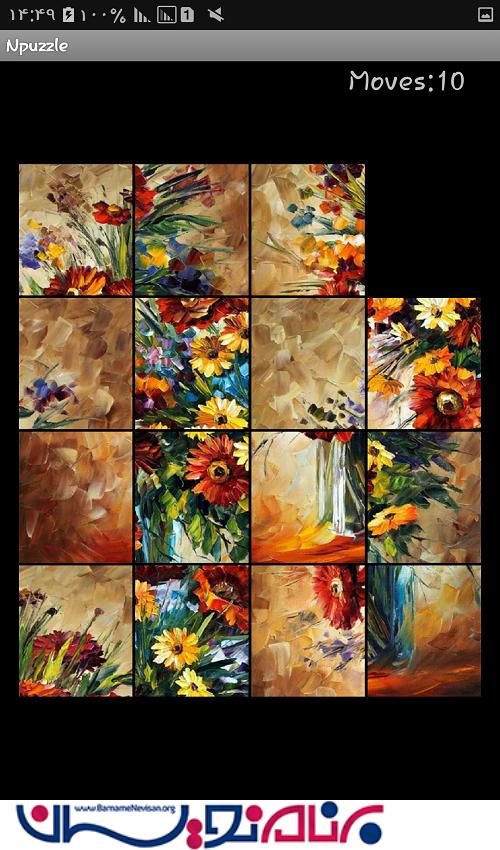
خروجی کار به صورت زیر است:

- Android
- 2k بازدید
- 5 تشکر