
ایجاد گالری تصاویر با امکان viewpager و متن در اندروید
چهارشنبه 23 دی 1394در این مقاله قصد داریم یک گالری تصاویر ایجاد نماییم که این گالری تصاویر قابلیت pager را دارد و علاوه بر آن یک متن را هم نمایش می دهد برای درک بهتر مطلب مقاله زیر را دنبال نمایید.
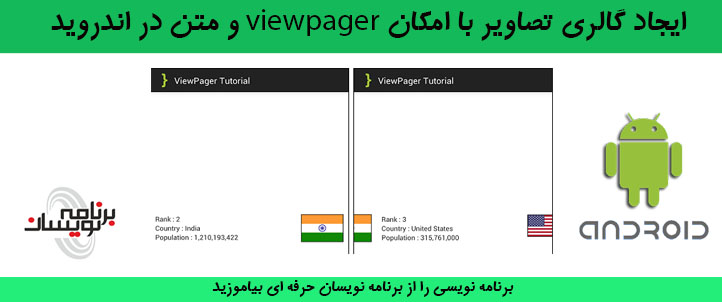
ابتدا یک پروژه ی جدید ایجاد نمایید و نام دلخواه برای خود پروژه و package دهید داخل کلاس MainActivity قطعه کد زیر را بنویسید:
قبل از مطالعه این مقاله می توانید ایجاد گالری تصاویر در اندروید را مطالعه نمایید، تا این مقاله را بهتر درک نمایید.
package com.androidbegin.viewpagertutorial;
import android.os.Bundle;
		import android.app.Activity;
		import android.support.v4.view.PagerAdapter;
		import android.support.v4.view.ViewPager;

public class MainActivity extends Activity {
	// Declare Variables
	ViewPager viewPager;
	PagerAdapter adapter;
	String[] rank;
	String[] country;
	String[] population;
	int[] flag;
	@Override
	public void onCreate(Bundle savedInstanceState) {
		super.onCreate(savedInstanceState);
		// Get the view from viewpager_main.xml
		setContentView(R.layout.viewpager_main);
		// Generate sample data
		rank = new String[] { "1", "2", "3", "4", "5", "6", "7", "8", "9", "10" };

		country = new String[] { "چین", "هند", "ایالات متحده",
				"اندونزی", "برزیل", "پاکستان", "نیجریه", "بنگلادش",
				"روسیه", "ژاپن" };

		population = new String[] { "1,354,040,000", "1,210,193,422",
				"315,761,000", "237,641,326", "193,946,886", "182,912,000",
				"170,901,000", "152,518,015", "143,369,806", "127,360,000" };

		flag = new int[] { R.drawable.china, R.drawable.india,
				R.drawable.unitedstates, R.drawable.indonesia,
				R.drawable.brazil, R.drawable.pakistan, R.drawable.nigeria,
				R.drawable.bangladesh, R.drawable.russia, R.drawable.japan };

		// Locate the ViewPager in viewpager_main.xml
		viewPager = (ViewPager) findViewById(R.id.pager);
		// Pass results to ViewPagerAdapter Class
		adapter = new ViewPagerAdapter(MainActivity.this, rank, country, population, flag);
		// Binds the Adapter to the ViewPager
		viewPager.setAdapter(adapter);

	}
}
در این مقاله ما از یک آرایه ای از رشته استفاده می نماییم و آن آرایه از رشته را به کلاس که ایجاد می نمایید پاس می دهد، داخل پوشه ی res/drawable عکس های مورد نظر را قرار می دهیم.
حالا یک activity دیگر ایجاد نمایید به صورت زیر:
<RelativeLayout xmlns:android="http://schemas.android.com/apk/res/android"
    android:layout_width="fill_parent"
    android:layout_height="fill_parent" >

    <android.support.v4.view.ViewPager
        android:id="@+id/pager"
        android:layout_width="wrap_content"
        android:layout_height="wrap_content" />

</RelativeLayout>
یک کلاس viewpagerdapter که از کلاس pageradapter ارث بری کند بسازید، و کد های زیر را داخل آن قرار دهید:
package com.androidbegin.viewpagertutorial;
import android.content.Context;
import android.support.v4.view.PagerAdapter;
import android.support.v4.view.ViewPager;
import android.view.LayoutInflater;
import android.view.View;
import android.view.ViewGroup;
import android.widget.ImageView;
import android.widget.RelativeLayout;
import android.widget.TextView;
public class ViewPagerAdapter extends PagerAdapter {
	// Declare Variables
	Context context;
	String[] rank;
	String[] country;
	String[] population;
	int[] flag;
	LayoutInflater inflater;
	public ViewPagerAdapter(Context context, String[] rank, String[] country,
			String[] population, int[] flag) {
		this.context = context;
		this.rank = rank;
		this.country = country;
		this.population = population;
		this.flag = flag;
	}

	@Override
	public int getCount() {
		return rank.length;
	}

	@Override
	public boolean isViewFromObject(View view, Object object) {
		return view == ((RelativeLayout) object);
	}

	@Override
	public Object instantiateItem(ViewGroup container, int position) {

		// Declare Variables
		TextView txtrank;
		TextView txtcountry;
		TextView txtpopulation;
		ImageView imgflag;

		inflater = (LayoutInflater) context
				.getSystemService(Context.LAYOUT_INFLATER_SERVICE);
		View itemView = inflater.inflate(R.layout.viewpager_item, container,
				false);

		// Locate the TextViews in viewpager_item.xml
		txtrank = (TextView) itemView.findViewById(R.id.rank);
		txtcountry = (TextView) itemView.findViewById(R.id.country);
		txtpopulation = (TextView) itemView.findViewById(R.id.population);

		// Capture position and set to the TextViews
		txtrank.setText(rank[position]);
		txtcountry.setText(country[position]);
		txtpopulation.setText(population[position]);

		// Locate the ImageView in viewpager_item.xml
		imgflag = (ImageView) itemView.findViewById(R.id.flag);
		// Capture position and set to the ImageView
		imgflag.setImageResource(flag[position]);

		// Add viewpager_item.xml to ViewPager
		((ViewPager) container).addView(itemView);

		return itemView;
	}

	@Override
	public void destroyItem(ViewGroup container, int position, Object object) {
		// Remove viewpager_item.xml from ViewPager
		((ViewPager) container).removeView((RelativeLayout) object);

	}
}
کلاس viewpageradapter سفارشی ، آرایه را به صورت رشته به viewpageradapter پاس می دهد، و متن و عکس مورد نظر را داخل textview و imageview مورد نظر تنظیم می نماید.
کد actvity برای صفحه ی viewpager_item به صورت زیر خواهد بود:
<?xml version="1.0" encoding="utf-8"?>
<RelativeLayout xmlns:android="http://schemas.android.com/apk/res/android"
    android:layout_width="fill_parent"
    android:layout_height="fill_parent"
    android:gravity="center"
    android:padding="10dp" >

    <TextView
        android:id="@+id/ranklabel"
        android:layout_width="wrap_content"
        android:layout_height="wrap_content"
        android:text="رتبه"/>

    <TextView
        android:id="@+id/rank"
        android:layout_width="wrap_content"
        android:layout_height="wrap_content"
        android:layout_toRightOf="@+id/ranklabel" />

    <TextView
        android:id="@+id/countrylabel"
        android:layout_width="wrap_content"
        android:layout_height="wrap_content"
        android:layout_below="@+id/ranklabel"
        android:text="کشور" />

    <TextView
        android:id="@+id/country"
        android:layout_width="wrap_content"
        android:layout_height="wrap_content"
        android:layout_below="@+id/rank"
        android:layout_toRightOf="@+id/countrylabel" />

    <TextView
        android:id="@+id/populationlabel"
        android:layout_width="wrap_content"
        android:layout_height="wrap_content"
        android:layout_below="@+id/countrylabel"
        android:text="جمعیت" />

    <TextView
        android:id="@+id/population"
        android:layout_width="wrap_content"
        android:layout_height="wrap_content"
        android:layout_below="@+id/country"
        android:layout_toRightOf="@+id/populationlabel" />

    <ImageView
        android:id="@+id/flag"
        android:layout_width="wrap_content"
        android:layout_height="wrap_content"
        android:layout_alignParentRight="true"
        android:background="#000000"
        android:padding="1dp" />

</RelativeLayout>
برای تغییر نام متن و ها و اپلیکیشن می توانید فایل string که داخل پوشه ی res/value قرار دارد را تغییر دهید:
<resources>
    <string name="app_name">ViewPager Tutorial</string>
    <string name="hello_world">Hello world!</string>
    <string name="menu_settings">Settings</string>
    <string name="ranklabel">"Rank : "</string>
    <string name="countrylabel">"Country : "</string>
    <string name="populationlabel">"Population : "</string>
</resources>
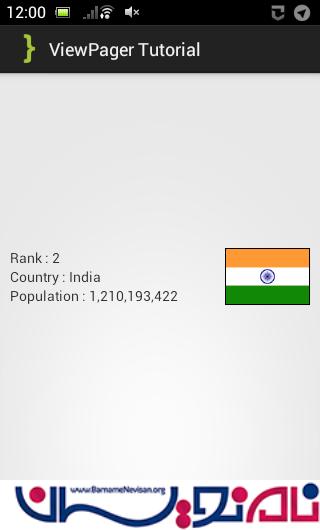
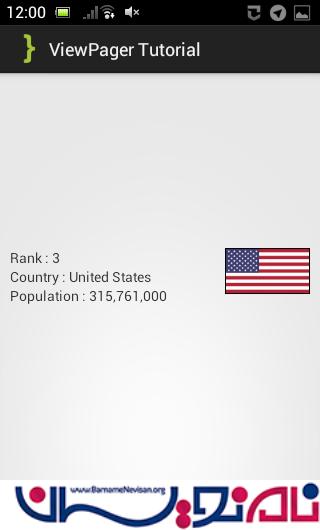
خروجی کار به صورت زیر خواهد بود:

- Android
- 3k بازدید
- 2 تشکر