
تغییر روشنایی صفحه نمایش با استفاده از seekbar در اندروید
جمعه 11 دی 1394در این مقاله قصد داریم با استفاده از seekbar روشنایی صفحه نمایش گوشی خود را زیاد و یا کم نماییم برای این کار باید از کنترل seekbar استفاده نماییم.
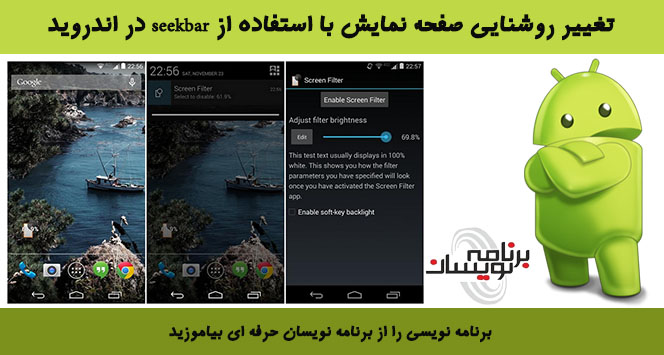
ابتدا برای این کار باید از یک seekbar استفاده نماییم.برای دریافت محتوای شی متدgetContentResolver را صدا می زنیم .و خود پنجره ای که در آن قرار داریم متد getWindow را دریافت می کند.
برای دریافت روشنایی از یک صفحه نمایش با استفاده از روش getinit ، که روشنایی فعلی از یک سیستم را باز می گردد.
برای افزایش و کاهش روشنایی از متد onprgress استفاده می شود.
و برای seekbar هم برای اینکه مقدار را افزایش و یا کاهش دهیم از متد setOnSeekBarChangeListener استفاده می شود.
در متد onprogress مجموعه ای از پیشرفت نوار seekbar با استفاده از درصد نمایش داده می شود.
قدم اول :درست کردن لایه ی activity است به صورت زیر:
<?xml version="1.0" encoding="utf-8"?>
<LinearLayout xmlns:android="http://schemas.android.com/apk/res/android"
              android:layout_width="fill_parent"
              android:layout_height="fill_parent"
              android:background="#475d5d"
              android:orientation="vertical" >
    <LinearLayout xmlns:android="http://schemas.android.com/apk/res/android"
                  android:layout_margin="5dp"
                  android:layout_width="fill_parent"
                  android:layout_height="wrap_content"
                  android:background="#354d5d"
                  android:orientation="vertical">
        <TextView
                android:layout_height="wrap_content"
                android:layout_width="wrap_content"
                android:text="کنترل روشنایی صفحه"
                android:layout_marginLeft="5dp"
                android:layout_marginTop="10dp"
                android:textColor="#ffffff"
                android:textStyle="bold" android:layout_gravity="right">
        </TextView>
        <SeekBar
                android:layout_width="300dp"
                android:layout_height="wrap_content"
                android:id="@+id/seekBar"
                android:progress="0"
                android:max="100"
                android:layout_marginTop="20dp"
                android:indeterminate="false"
                android:layout_gravity="right"/>
        <LinearLayout xmlns:android="http://schemas.android.com/apk/res/android"
                      android:layout_width="fill_parent"
                      android:layout_height="25dp"
                      android:background="#354d5d"
                      android:orientation="horizontal"
                      android:layout_marginTop="20dp" android:layout_gravity="right">
            <TextView
                    android:layout_height="wrap_content"
                    android:layout_width="wrap_content"
                    android:text="0"
                    android:textStyle="bold"
                    android:textSize="12dp"
                    android:textColor="#ffffff"
                    android:layout_marginLeft="25dp"/>
            <TextView
                    android:layout_height="wrap_content"
                    android:layout_width="wrap_content"
                    android:textSize="12dp"
                    android:text="20"
                    android:textColor="#ffffff"
                    android:layout_marginLeft="30dp"/>
            <TextView
                    android:layout_height="wrap_content"
                    android:textSize="12dp"
                    android:layout_width="wrap_content"
                    android:text="40"
                    android:textColor="#ffffff"
                    android:layout_marginLeft="32dp"/>
            <TextView
                    android:layout_height="wrap_content"
                    android:textSize="12dp"
                    android:layout_width="wrap_content"
                    android:text="60"
                    android:textColor="#ffffff"
                    android:layout_marginLeft="36dp"/>
            <TextView
                    android:textSize="12dp"
                    android:layout_height="wrap_content"
                    android:layout_width="wrap_content"
                    android:text="80"
                    android:textColor="#ffffff"
                    android:layout_marginLeft="38dp"/>
            <TextView
                    android:textSize="12dp"
                    android:layout_height="wrap_content"
                    android:layout_width="wrap_content"
                    android:text="100"
                    android:textColor="#ffffff"
                    android:layout_marginLeft="42dp"/>
        </LinearLayout>
    </LinearLayout>
    <TextView
            android:layout_width="fill_parent"
            android:layout_height="wrap_content"
            android:text=""
            android:id="@+id/txtPercentage"/>
</LinearLayout>
قدم دوم :درست کردن کلاس جاوا:
ابتدا باید ابزارهای استفاده شده را تعریف نمایید، با استفاده از متد getinit روشنایی فعلی را بر می گرداند، حالا با استفاده از متد onprogress می توانید روشنایی صفحه را تغییر دهید، برای تغییر روشنایی صفحه از متد setOnSeekBarChangeListener استفاده می کنیم.
ابتدا یک مقداری پیش فرض در نظر بگیرید و بعد با استفاده از این متد مقدار را تغییر خواهد کرد.
package com.barnamenevisan.seekbar;
import android.app.Activity;
import android.content.ContentResolver;
import android.os.Bundle;
import android.provider.Settings.SettingNotFoundException;
import android.provider.Settings.System;
import android.util.Log;
import android.view.Window;
import android.view.WindowManager.LayoutParams;
import android.widget.SeekBar;
import android.widget.SeekBar.OnSeekBarChangeListener;
import android.widget.TextView;
public class MyActivity extends Activity {
    private SeekBar seekBar;
  //Variable to store brightness value
    private int brightness;
    //Content resolver used as a handle to the system's settings
    private ContentResolver cResolver;
    //Window object, that will store a reference to the current window
    private Window window;
    TextView txtPerc;
    /** Called when the activity is first created. */
    @Override
    public void onCreate(Bundle savedInstanceState)
    {
        super.onCreate(savedInstanceState);
        setContentView(R.layout.main);
//Instantiate seekbar object
        seekBar = (SeekBar) findViewById(R.id.seekBar);
        txtPerc = (TextView) findViewById(R.id.txtPercentage);
        //Get the content resolver
        cResolver =  getContentResolver();
 //Get the current window
        window = getWindow();
        //Set the seekbar range between 0 and 255
        //seek bar settings//
        //sets the range between 0 and 255
        seekBar.setMax(255);
        //set the seek bar progress to 1
        seekBar.setKeyProgressIncrement(1);
        try
        {
           //Get the current system brightness
            brightness = System.getInt(cResolver, System.SCREEN_BRIGHTNESS);
        }
        catch (SettingNotFoundException e)
        {
            //Throw an error case it couldn't be retrieved
            Log.e("Error", "Cannot access system brightness");
            e.printStackTrace();
        }
      //Set the progress of the seek bar based on the system's brightness
        seekBar.setProgress(brightness);
        //Register OnSeekBarChangeListener, so it can actually change values
        seekBar.setOnSeekBarChangeListener(new OnSeekBarChangeListener()
        {
            public void onStopTrackingTouch(SeekBar seekBar)
            {
                //Set the system brightness using the brightness variable value
                System.putInt(cResolver, System.SCREEN_BRIGHTNESS, brightness);
                //Get the current window attributes
                LayoutParams layoutpars = window.getAttributes();
                //Set the brightness of this window
                layoutpars.screenBrightness = brightness / (float)255;
                //Apply attribute changes to this window
                window.setAttributes(layoutpars);
            }
            public void onStartTrackingTouch(SeekBar seekBar)
            {
                //Nothing handled here

            }
          public void onProgressChanged(SeekBar seekBar, int progress, boolean fromUser)
            {

               //Set the minimal brightness level

                //if seek bar is 20 or any value below
                if(progress<=20)
                {
                    //Set the brightness to 20
                    brightness=20;
                }
                else //brightness is greater than 20
                {
                    //Set brightness variable based on the progress bar
                    brightness = progress;
                }
                //Calculate the brightness percentage
                float perc = (brightness /(float)255)*100;
                //Set the brightness percentage
                txtPerc.setText((int)perc +" %");
            }
        });

    }}
داخل فایل androidmanifest قطعه کد زیر را می نویسید:
<manifest xmlns:android="http://schemas.android.com/apk/res/android"
          package="com.barnamenevisan.seekbar"
          android:versionCode="1"
          android:versionName="1.0">
    <uses-sdk android:minSdkVersion="15"/>
    <uses-permission android:name="android.permission.WRITE_SETTINGS"/>
    <application android:label="کنترل روشنایی صفحه" android:icon="@drawable/pic8">
        <activity android:name="MyActivity"
                  android:label="@string/app_name">
            <intent-filter>
                <action android:name="android.intent.action.MAIN"/>
                <category android:name="android.intent.category.LAUNCHER"/>
            </intent-filter>
        </activity>
    </application>
</manifest>
خروجی به صورت زیر خواهد بود:
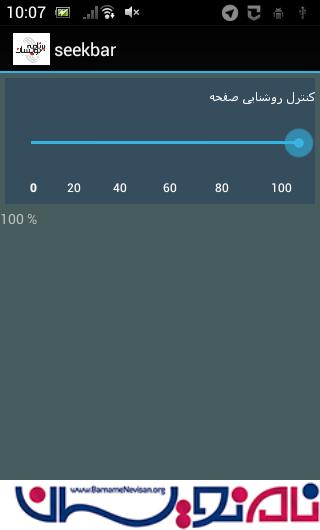
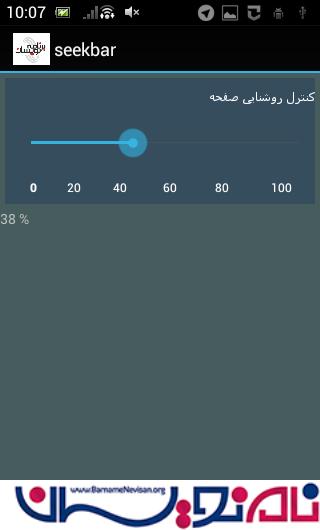
اگر برنامه را روی گوشی اجرا نمایید روشنایی صفحه ی گوشی تغییر خواهد کرد و کم یا زیاد خواهد شد.

- Android
- 2k بازدید
- 2 تشکر