
روشن و خاموش کردن Bluetooth در اندروید
یکشنبه 8 آذر 1394در این مقاله می خواهیم با استفاده از کد نویسی Bluetooth گوشی را روشن و خاموش کنیم با استفاده از BluetoothAdapter می توانیم bluetooth گوشی خود را فعال یا غیر فعال کنیم.
ابتدا یک پروژه ی جدید بسازید، داخل Activity زیر کد های زیر را قرار دهید:
داخل activity قطعه کد زیر را بنویسید:
<RelativeLayout xmlns:android="http://schemas.android.com/apk/res/android"
    xmlns:tools="http://schemas.android.com/tools"
    android:layout_width="match_parent"
    android:layout_height="match_parent"
    tools:context=".MainActivity" >

    <TextView android:text="" android:id="@+id/out" android:layout_width="wrap_content" android:layout_height="wrap_content"></TextView>
    <Button
        android:id="@+id/button1"
        android:layout_width="wrap_content"
        android:layout_height="wrap_content"
        android:text="روشن کردن Bluetooth"
        android:layout_below="@+id/out" android:layout_centerHorizontal="true" android:layout_marginTop="64dp"/>

    <Button
        android:id="@+id/button3"
        android:layout_width="wrap_content"
        android:layout_height="wrap_content"
        android:layout_marginTop="28dp"
        android:text="خاموش کردن Bluetooth" android:layout_alignLeft="@+id/button1" android:layout_below="@+id/button1"/>

</RelativeLayout>
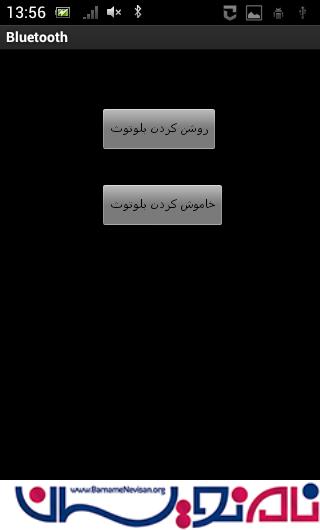
برای activity خود از دو دکمه استفاده می نماییم که روشن و خاموش کردن bluetooth را در دستگاه بر عهده دارد.
حالا برای کلاس جاوا برای دکمه های روشن و خاموش کردن بلوتوث رویداد هایی نوشته شود
برای روشن کردن بلوتوث از کد های زیر استفاده می نمایید:
  button1.setOnClickListener(new View.OnClickListener() {
        public void onClick(View v) {
            if (!mBluetoothAdapter.isEnabled()) {
                Intent enableBtIntent = new Intent(BluetoothAdapter.ACTION_REQUEST_ENABLE);
                startActivityForResult(enableBtIntent, REQUEST_ENABLE_BT);
            }
        }
    });
از یک bluetoothadapter استفاده می نماییم اگر فعال بود درخواست روشن شدن بلوتوث را فعال می کند، برای غیر فعال کردن بلوتوث هم BluetoothAdapter را غیر فعال می نماییم.
کد های فعال و غیر فعال کردن به صورت زیر خواهد بود:
import android.os.Bundle;
import android.app.Activity;
import android.view.Menu;
import android.app.Activity;
import android.bluetooth.BluetoothAdapter;
import android.content.Context;
import android.content.Intent;
import android.os.Bundle;
import android.util.Log;
import android.view.View;
import android.widget.Button;
import android.widget.TextView;
import android.widget.Toast;

public class MainActivity extends Activity {
      private static final int REQUEST_ENABLE_BT = 0;
      private static final int REQUEST_DISCOVERABLE_BT = 0;
    @Override
    protected void onCreate(Bundle savedInstanceState) {
        super.onCreate(savedInstanceState);
        setContentView(R.layout.activity_main);
    final TextView out=(TextView)findViewById(R.id.out);
    final Button button1 = (Button) findViewById(R.id.button1);
    final Button button2 = (Button) findViewById(R.id.button2);
    final Button button3 = (Button) findViewById(R.id.button3);
    final BluetoothAdapter mBluetoothAdapter = BluetoothAdapter.
    		getDefaultAdapter();
    if (mBluetoothAdapter == null) {
       out.append("device not supported");
    }
    button1.setOnClickListener(new View.OnClickListener() {
        public void onClick(View v) {
            if (!mBluetoothAdapter.isEnabled()) {
                Intent enableBtIntent = new Intent(BluetoothAdapter.ACTION_REQUEST_ENABLE);
                startActivityForResult(enableBtIntent, REQUEST_ENABLE_BT);
            }
        }
    });

    button3.setOnClickListener(new View.OnClickListener() {
        @Override
        public void onClick(View arg0) {
            mBluetoothAdapter.disable();
//            out.append("TURN_OFF BLUETOOTH");
            Context context = getApplicationContext();
               CharSequence text = "TURNING_OFF BLUETOOTH";
               int duration = Toast.LENGTH_LONG;
               Toast toast = Toast.makeText(context, text, 15);
               toast.show();
            }
    });
}
خروجی به صورت زیر خواهد بود:
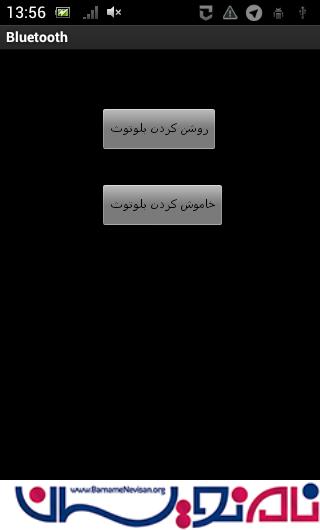
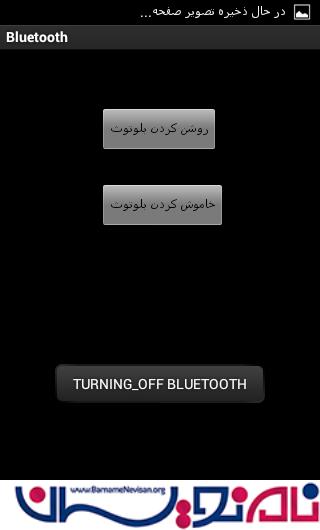
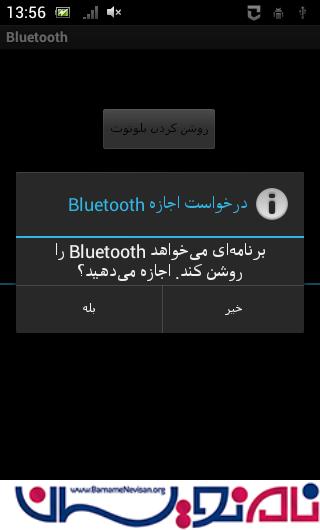
حالا رمانی که دکمه ی روشن شدن را بزنیم:

- Android
- 4k بازدید
- 3 تشکر