
ثبت داده درListView، GridView بدون استفاده از DataBase در Asp.Net
دوشنبه 6 مهر 1394در این مقاله قصد داریم در مورد نحوه ی ثبت داده با استفاده از ListView و GridView و صفحه بندی کردن آن ها بدون استفاده از هر نوع دیتابیس را آموزش دهیم.
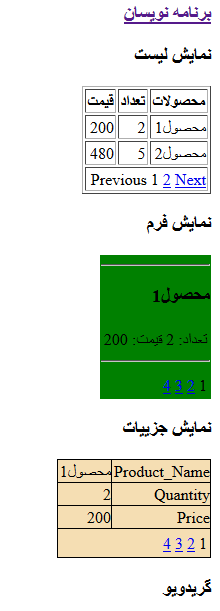
قدم اول:یک پروژه ی جدید را باز کنید.
قدم دوم :روی پروژه ی جدید راست کلیک کرده، و گزینه ی Add New Item را انتخاب کنید ویک صفحه ی Webform جدید را بسازید.یک ListView و یک GridView را اضافه می کنید.
داخل صفحه ی DesignUI قطعه کد زیر را می نویسید:
<body>
 <form id="form1" runat="server">
 <div>
                <div style="width: 50%">
                    <div>
                        <h3>ListView</h3>
                        <asp:ListView ID="lvCustomers" runat="server" GroupPlaceholderID="groupPlaceHolder1"
ItemPlaceholderID="itemPlaceHolder1" OnPagePropertiesChanging="OnPagePropertiesChanging">
                            <LayoutTemplate>
                                <table border="1">
                                    <tr>
                                        <th>Product
</th>
                                        <th>Quantity
</th>
                                        <th>Price
</th>
                                    </tr>
                                    <asp:PlaceHolder runat="server" ID="groupPlaceHolder1"></asp:PlaceHolder>
                                    <tr>
                                        <td colspan="3">
                                            <asp:DataPager ID="DataPager1" runat="server" PagedControlID="lvCustomers" PageSize="2">
                                                <Fields>
                                                    <asp:NextPreviousPagerField ButtonType="Link" ShowFirstPageButton="false" ShowPreviousPageButton="true"
ShowNextPageButton="false" />
                                                    <asp:NumericPagerField ButtonType="Link" />
                                                    <asp:NextPreviousPagerField ButtonType="Link" ShowNextPageButton="true" ShowLastPageButton="false" ShowPreviousPageButton="false" />
                                                </Fields>
                                            </asp:DataPager>
                                        </td>
                                    </tr>
                                </table>
                            </LayoutTemplate>
                            <GroupTemplate>
                                <tr>
                                    <asp:PlaceHolder runat="server" ID="itemPlaceHolder1"></asp:PlaceHolder>
                                </tr>
                            </GroupTemplate>
                            <ItemTemplate>
                                <td><%# Eval("Product_Name") %>
                                </td>
                                <td><%# Eval("Quantity") %>
                                </td>
                                <td><%# Eval("Price") %>
                                </td>
                            </ItemTemplate>
                        </asp:ListView>
                    </div>
                    <br />
                    <h3>FormView</h3>
                    <div>
                        <asp:FormView ID="FormView1" runat="server"
AllowPaging="True" EnableViewState="False" OnPageIndexChanging="FormView1_PageIndexChanging" BackColor="Green">
                            <ItemTemplate>
                                <hr />
                                <h3><%# Eval("Product_Name") %>
                                </h3>
                                <table border="0">
                                    <tr>
                                        <td class="ProductPropertyLabel">Quantity:</td>
                                        <td class="ProductPropertyValue"><%# Eval("Quantity") %>
                                        </td>
                                        <td class="ProductPropertyLabel">Price:</td>
                                        <td class="ProductPropertyValue"><%# Eval("Price")%>
                                        </td>
                                    </tr>
                                </table>
                                <hr />
                            </ItemTemplate>
                        </asp:FormView>
                    </div>
                </div>
                <div style="width: 50%">
                    <h3>DetailsView</h3>
                    <div>
                        <div>
                            <asp:DetailsView ID="DetailsView1" OnPageIndexChanging="DetailsView1_PageIndexChanging" BackColor="Wheat"
AllowPaging="true" runat="server" />
                        </div>
                    </div>
                    <h3>GridView</h3>
                    <div>
                        <asp:GridView ID="gvExample" runat="server" AllowPaging="true" PageSize="2" AutoGenerateColumns="False" BackColor="PINK" BorderColor="#E7E7FF"
BorderWidth="1px" CellPadding="3" OnPageIndexChanging="gvExample_PageIndexChanging">
                            <Columns>
                                <asp:TemplateField HeaderText="Product_Name">
                                    <ItemTemplate>
                                        <asp:Label ID="lblProduct" runat="server" Text='<%#Eval("Product_Name")%>'>
                                        </asp:Label>
                                    </ItemTemplate>
                                </asp:TemplateField>
                                <asp:TemplateField HeaderText="Quantity">
                                    <ItemTemplate>
                                        <asp:Label ID="lblQuantity" runat="server" Text='<%#Eval("Quantity")%>'>
                                        </asp:Label>
                                    </ItemTemplate>
                                </asp:TemplateField>
                                <asp:TemplateField HeaderText="Price">
                                    <ItemTemplate>
                                        <asp:Label ID="lblPrice" runat="server" Text='<%#Eval("Price")%>'>
                                        </asp:Label>
                                    </ItemTemplate>
                                </asp:TemplateField>
                            </Columns>
                        </asp:GridView>
                    </div>
                </div>
            </div>
    </form>
    </body>
داخل صفحه ی Code Behind قطعه کد زیر را بنویسید:
using System;
using System.Collections.Generic;
using System.Data;
using System.Data.SqlClient;
using System.Linq;
using System.Web;
using System.Web.UI;
using System.Web.UI.WebControls;

namespace WebApplication2
{
    public partial class WebForm1 : System.Web.UI.Page
    {
        protected void Page_Load(object sender, EventArgs e)
        {
              if (!IsPostBack) {
            BindListView();
            BindFormView();
            BindDetailsView();
            BindGridView();
        }

        }
          protected void BindListView()
    {
        //Creating a dataset
        DataSet ds = new DataSet();
        DataTable dt;
        DataRow dr;
        DataColumn pName;
        DataColumn pQty;
        DataColumn pPrice;
        //create an object of datatable
        dt = new DataTable();
        //creating column of datatable with datatype
        pName = new DataColumn("Product_Name", Type.GetType("System.String"));
        pQty = new DataColumn("Quantity", Type.GetType("System.Int32"));
        pPrice = new DataColumn("Price", Type.GetType("System.Int32"));
        //bind data table columns in datatable
        dt.Columns.Add(pName);
        dt.Columns.Add(pQty);
        dt.Columns.Add(pPrice);
        //creating data row and assiging the value to columns of datatable
        dr = dt.NewRow();
        dr["Product_Name"] = "Product 1";
        dr["Quantity"] = 2;
        dr["Price"] = 200;
        dt.Rows.Add(dr);

        dr = dt.NewRow();
        dr["Product_Name"] = "Product 2";
        dr["Quantity"] = 5;
        dr["Price"] = 480;
        dt.Rows.Add(dr);

        dr = dt.NewRow();
        dr["Product_Name"] = "Product 3";
        dr["Quantity"] = 8;
        dr["Price"] = 100;
        dt.Rows.Add(dr);

        dr = dt.NewRow();
        dr["Product_Name"] = "Product 4";
        dr["Quantity"] = 2;
        dr["Price"] = 500;
        dt.Rows.Add(dr);
        //Add datatable to the dataset
        ds.Tables.Add(dt);
        //bind data to data controls
        lvCustomers.DataSource = ds.Tables[0];
        lvCustomers.DataBind();
    }
    //paging code
    protected void OnPagePropertiesChanging(object sender, PagePropertiesChangingEventArgs e)
    {
        (lvCustomers.FindControl("DataPager1") as DataPager).SetPageProperties(e.StartRowIndex, e.MaximumRows, false);
        this.BindListView();
    }

    protected void BindFormView()
    {

        //Creating a dataset
        DataSet ds = new DataSet();
        DataTable dt;
        DataRow dr;
        DataColumn pName;
        DataColumn pQty;
        DataColumn pPrice;
        //create an object of datatable
        dt = new DataTable();
        //creating column of datatable with datatype
        pName = new DataColumn("Product_Name", Type.GetType("System.String"));
        pQty = new DataColumn("Quantity", Type.GetType("System.Int32"));
        pPrice = new DataColumn("Price", Type.GetType("System.Int32"));
        //bind data table columns in datatable
        dt.Columns.Add(pName);
        dt.Columns.Add(pQty);
        dt.Columns.Add(pPrice);
        //creating data row and assiging the value to columns of datatable
        dr = dt.NewRow();
        dr["Product_Name"] = "Product 1";
        dr["Quantity"] = 2;
        dr["Price"] = 200;
        dt.Rows.Add(dr);

        dr = dt.NewRow();
        dr["Product_Name"] = "Product 2";
        dr["Quantity"] = 5;
        dr["Price"] = 480;
        dt.Rows.Add(dr);

        dr = dt.NewRow();
        dr["Product_Name"] = "Product 3";
        dr["Quantity"] = 8;
        dr["Price"] = 100;
        dt.Rows.Add(dr);

        dr = dt.NewRow();
        dr["Product_Name"] = "Product 4";
        dr["Quantity"] = 2;
        dr["Price"] = 500;
        dt.Rows.Add(dr);
        //Add datatable to the dataset
        ds.Tables.Add(dt);
        //bind data to data controls
        FormView1.DataSource = ds.Tables[0];
        FormView1.DataBind();
    }
    //paging code
    protected void FormView1_PageIndexChanging(object sender, FormViewPageEventArgs e)
    {
        FormView1.PageIndex = e.NewPageIndex;
        BindFormView();
    }

    protected void BindDetailsView()
    {
        //Creating a dataset
        DataSet ds = new DataSet();
        DataTable dt;
        DataRow dr;
        DataColumn pName;
        DataColumn pQty;
        DataColumn pPrice;
        //create an object of datatable
        dt = new DataTable();
        //creating column of datatable with datatype
        pName = new DataColumn("Product_Name", Type.GetType("System.String"));
        pQty = new DataColumn("Quantity", Type.GetType("System.Int32"));
        pPrice = new DataColumn("Price", Type.GetType("System.Int32"));
        //bind data table columns in datatable
        dt.Columns.Add(pName);
        dt.Columns.Add(pQty);
        dt.Columns.Add(pPrice);
        //creating data row and assiging the value to columns of datatable
        dr = dt.NewRow();
        dr["Product_Name"] = "Product 1";
        dr["Quantity"] = 2;
        dr["Price"] = 200;
        dt.Rows.Add(dr);

        dr = dt.NewRow();
        dr["Product_Name"] = "Product 2";
        dr["Quantity"] = 5;
        dr["Price"] = 480;
        dt.Rows.Add(dr);

        dr = dt.NewRow();
        dr["Product_Name"] = "Product 3";
        dr["Quantity"] = 8;
        dr["Price"] = 100;
        dt.Rows.Add(dr);

        dr = dt.NewRow();
        dr["Product_Name"] = "Product 4";
        dr["Quantity"] = 2;
        dr["Price"] = 500;
        dt.Rows.Add(dr);
        //Add datatable to the dataset
        ds.Tables.Add(dt);
        //bind data to data controls
        DetailsView1.DataSource = ds.Tables[0];
        DetailsView1.DataBind();
    }
    //paging code
    protected void DetailsView1_PageIndexChanging(object sender, DetailsViewPageEventArgs e)
    {
        DetailsView1.PageIndex = e.NewPageIndex;
        BindDetailsView();
    }

    protected void BindGridView()
    {
        //Creating a dataset
        DataSet ds = new DataSet();
        DataTable dt;
        DataRow dr;
        DataColumn pName;
        DataColumn pQty;
        DataColumn pPrice;
        //create an object of datatable
        dt = new DataTable();
        //creating column of datatable with datatype
        pName = new DataColumn("Product_Name", Type.GetType("System.String"));
        pQty = new DataColumn("Quantity", Type.GetType("System.Int32"));
        pPrice = new DataColumn("Price", Type.GetType("System.Int32"));
        //bind data table columns in datatable
        dt.Columns.Add(pName);
        dt.Columns.Add(pQty);
        dt.Columns.Add(pPrice);
        //creating data row and assiging the value to columns of datatable
        dr = dt.NewRow();
        dr["Product_Name"] = "Product 1";
        dr["Quantity"] = 2;
        dr["Price"] = 200;
        dt.Rows.Add(dr);

        dr = dt.NewRow();
        dr["Product_Name"] = "Product 2";
        dr["Quantity"] = 5;
        dr["Price"] = 480;
        dt.Rows.Add(dr);

        dr = dt.NewRow();
        dr["Product_Name"] = "Product 3";
        dr["Quantity"] = 8;
        dr["Price"] = 100;
        dt.Rows.Add(dr);

        dr = dt.NewRow();
        dr["Product_Name"] = "Product 4";
        dr["Quantity"] = 2;
        dr["Price"] = 500;
        dt.Rows.Add(dr);
        //Add datatable to the dataset
        ds.Tables.Add(dt);
        //bind data to data controls
        gvExample.DataSource = ds.Tables[0];
        gvExample.DataBind();

    }
    //paging code
    protected void gvExample_PageIndexChanging(object sender, GridViewPageEventArgs e)
    {
        gvExample.PageIndex = e.NewPageIndex;
        BindGridView();
    }
}
    }
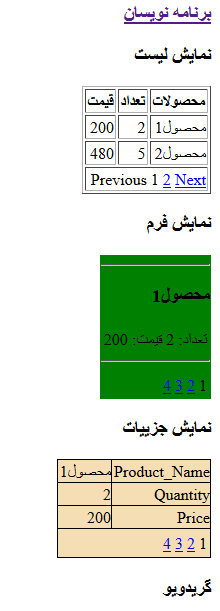
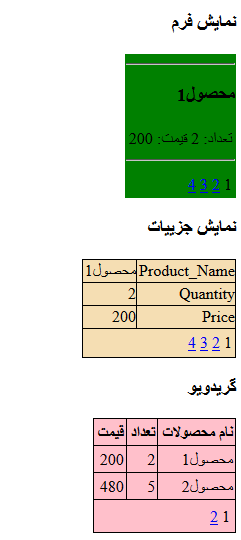
وقتی اجرا کنید به صورت زیر خواهد بود:

- ASP.net
- 2k بازدید
- 3 تشکر