
نحوه استفاده از Balloon Pop Extender و کنترل Ajax Calendar در ASP.Net
پنجشنبه 4 تیر 1394در این مقاله نحوه استفاده از Balloon Pop Extender و کنترل Ajax Calendar را در ASP.Net به شما آموزش خواهیم داد.
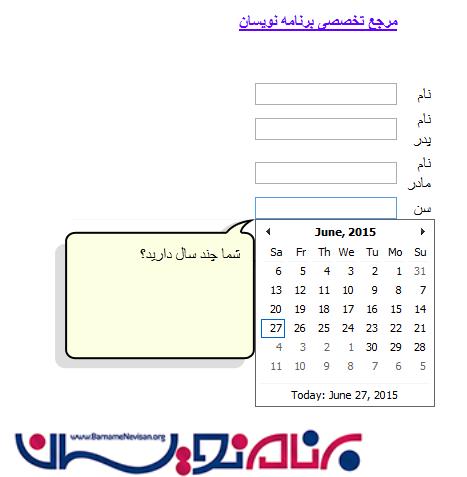
جهت استفاده از Balloon Pop Extender و کنترل Ajax Calendar را در ASP.Net مراحل زیر را انجام می دهیم.
بخش آغازین
مرحله 1
Visual Studio را اجرا کنید و یک empty website ایجاد کنید و آن را Calendar_demo بنامید.
مرحله 2
در Solution Explorer بر روی اسم پروژه راست کلیک کنید و یک Web Form به پروژه اضافه کنید و آن را calendar_demo.aspx بنامید.
بخش طراحی
مرحله 3
حال فایل calendar_demo.aspx را باز کنید و کدهای زیر را در آن وارد کنید.
<%@ Page Language="C#" AutoEventWireup="true" CodeFile="Default.aspx.cs" Inherits="_Default" %>
<%@ Register Assembly="AjaxControlToolkit" Namespace="AjaxControlToolkit" TagPrefix="asp" %>
<!DOCTYPE html PUBLIC "-//W3C//DTD XHTML 1.0 Transitional//EN" "http://www.w3.org/TR/xhtml1/DTD/xhtml1-transitional.dtd">
<html xmlns="http://www.w3.org/1999/xhtml">
<head runat="server">
<title></title>
<style type="text/css">
.style2
{
width: 95px;
}
.style3
{
width: 188px;
}
.style4
{
width: 23px;
}
.style5
{
text-decoration: underline;
font-size: large;
}
.style6
{
width: 226px;
}
.style7
{
text-decoration: underline;
font-size: x-large;
}
.style8
{
width: 258px;
}
.style9
{
width: 40px;
}
.auto-style2 {
width: 365px;
}
.auto-style3 {
width: 101px;
}
</style>
</head>
<body dir="rtl">
<form id="form1" runat="server">
<asp:ToolkitScriptManager ID="ToolkitScriptManager1" runat="server">
</asp:ToolkitScriptManager>
<div id="man" style="width: 400px; margin: 0px 50px 0px 0px;">
<table style="width: 66%; margin-left: 119px;">
<caption class="style5">
</caption>
<tr>
<td class="style4">
</td>
<td class="auto-style3">
</td>
<td class="auto-style2">
<a href="http://www.barnamenevisan.org">
<asp:Label ID="Label2" runat="server" ForeColor="#6600FF"
style="font-weight: 700; text-decoration: underline"
Text="مرجع تخصصی برنامه نویسان"></asp:Label>
</a>
</td>
</tr>
<tr>
<td class="style4">
</td>
<td class="auto-style3">
</td>
<td class="auto-style2">
</td>
</tr>
<tr>
<td class="style4">
</td>
<td class="auto-style3">
</td>
<td class="auto-style2">
</td>
</tr>
<tr>
<td class="style4">
</td>
<td class="auto-style3">
نام </td>
<td class="auto-style2" >
<asp:TextBox ID="TextBox1" runat="server"></asp:TextBox>
<asp:BalloonPopupExtender ID="BalloonPopupExtender1" BalloonPopupControlID="Panel1" TargetControlID="TextBox1" runat="server">
</asp:BalloonPopupExtender>
<asp:Panel ID="Panel1" runat="server">
لطفا نام خود را وارد کنید
</asp:Panel>
</td>
<td>
</td>
</tr>
<tr>
<td class="style4">
</td>
<td class="auto-style3">
نام پدر</td>
<td class="auto-style2">
<asp:TextBox ID="TextBox2" runat="server"></asp:TextBox>
<asp:BalloonPopupExtender ID="BalloonPopupExtender2" BalloonPopupControlID="Panel2" TargetControlID="TextBox2" runat="server">
</asp:BalloonPopupExtender>
<asp:Panel ID="Panel2" runat="server">
لطفا نام پدر خود را وارد کنید
</asp:Panel>
</td>
</tr>
<tr>
<td class="style4">
</td>
<td class="auto-style3">
نام مادر</td>
<td class="auto-style2">
<asp:TextBox ID="TextBox3" runat="server"></asp:TextBox>
<asp:BalloonPopupExtender ID="BalloonPopupExtender3" BalloonPopupControlID="Panel3" TargetControlID="TextBox3" runat="server">
</asp:BalloonPopupExtender>
<asp:Panel ID="Panel3" runat="server">
لطفا نام مادر خود را وارد کنید
</asp:Panel>
</td>
<td>
</td>
</tr>
<tr>
<td class="style4">
</td>
<td class="auto-style3">
سن
</td>
<td class="auto-style2">
<asp:TextBox ID="TextBox4" runat="server"></asp:TextBox>
<asp:BalloonPopupExtender ID="BalloonPopupExtender5" BalloonPopupControlID="Panel5" TargetControlID="TextBox4" runat="server">
</asp:BalloonPopupExtender>
<asp:Panel ID="Panel5" runat="server">
شما چند سال دارید؟
</asp:Panel>
</td>
</tr>
<tr>
<td class="style2">
</td>
<td class="auto-style3">
<asp:CalendarExtender ID="CalendarExtender1" OnClientDateSelectionChanged="SelectDate" TargetControlID="TextBox4" runat="server">
</asp:CalendarExtender>
<script type="text/javascript">
function SelectDate(e) {
var PresentDay = new Date();
var dateOfBirth = e.get_selectedDate();
var months = (PresentDay.getMonth() - dateOfBirth.getMonth() + (12 * (PresentDay.getFullYear() - dateOfBirth.getFullYear())));
alert("شما " + Math.round(months / 12) + " ساله هستید");
document.getElementById("TextBox6").value = Math.round(months / 12);
}
</script>
</td>
<td class="auto-style2">
<asp:TextBox ID="TextBox6" ReadOnly="true" runat="server" Font-Size="12px" ></asp:TextBox>
</td>
</tr>
<tr>
<td class="style4">
</td>
<td class="auto-style3">
مقطع </td>
<td class="auto-style2">
<asp:DropDownList ID="DropDownList1" runat="server">
<asp:ListItem>-- یک مقطع تحصیلی را انتخاب کنید--</asp:ListItem>
<asp:ListItem>اول ابتدایی</asp:ListItem>
<asp:ListItem>دوم ابتدایی</asp:ListItem>
<asp:ListItem>سوم ابتدایی</asp:ListItem>
<asp:ListItem>چهارم ابتدایی</asp:ListItem>
<asp:ListItem>پنجم ابتدایی</asp:ListItem>
<asp:ListItem>ششم ابتدایی</asp:ListItem>
<asp:ListItem>اول راهنمایی</asp:ListItem>
<asp:ListItem>دوم راهنمایی</asp:ListItem>
<asp:ListItem>سوم راهنمایی</asp:ListItem>
<asp:ListItem>اول دبیرستان</asp:ListItem>
<asp:ListItem>دوم دبیرستان</asp:ListItem>
<asp:ListItem>سوم دبیرستان</asp:ListItem>
</asp:DropDownList>
</td>
</tr>
<tr>
<td class="style4">
</td>
<td class="auto-style3">
تلفن
</td>
<td class="auto-style2">
<asp:TextBox ID="TextBox5" runat="server"></asp:TextBox>
<span style="float: left">
<asp:BalloonPopupExtender ID="BalloonPopupExtender4" BalloonPopupControlID="Panel4" TargetControlID="TextBox5" runat="server">
</asp:BalloonPopupExtender>
</span>
<asp:Panel ID="Panel4" runat="server">
لطفا شماره لطفا خود را وارد کنید
</asp:Panel>
</td>
</tr>
<tr>
<td class="style4">
</td>
<td class="auto-style3">
</td>
<td class="auto-style2">
</td>
</tr>
<tr>
<td class="style4">
</td>
<td class="auto-style3">
</td>
<td class="auto-style2">
<asp:Button ID="Button1" runat="server" Text="ارسال" onclick="Button1_Click" />
</td>
</tr>
</table>
</div>
<p>
<table style="width:100%;">
<caption class="style7">
</caption>
<tr>
<td class="style6">
</td>
<td align="center" class="style8">
</td>
<td>
</td>
</tr>
<tr>
<td class="style6">
</td>
<td class="style8">
</td>
<td>
</td>
</tr>
<tr>
<td class="style6">
</td>
<td class="style8">
<asp:Label ID="Label1" runat="server"></asp:Label>
</td>
<td>
</td>
</tr>
</table>
</p>
</form>
</body>
</html>
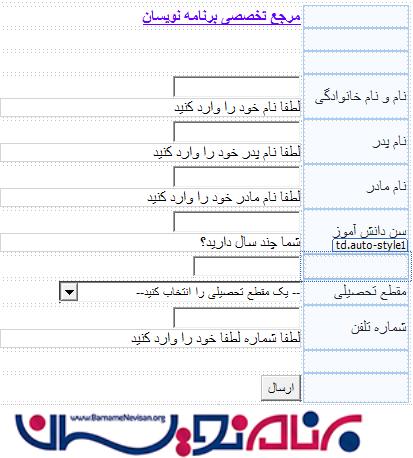
صفحه Design به شکل زیر است.
بخش کد
مرحله 4
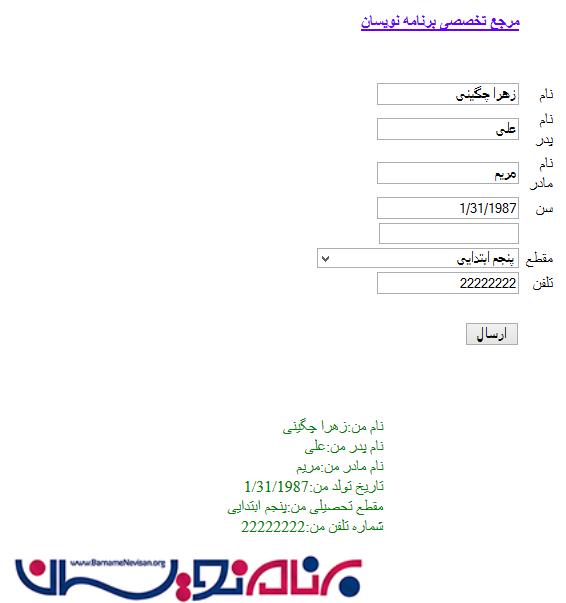
فایل calendar_demo.aspx.cs را باز کنید، کدهای زیر را جهت چاپ اطلاعات وارد شده در فرم در این فابل وارد کنید.
using System;
using System.Collections.Generic;
using System.Linq;
using System.Web;
using System.Web.UI;
using System.Web.UI.WebControls;


public partial class _Default : System.Web.UI.Page
{
    protected void Page_Load(object sender, EventArgs e)
    {

    }
    protected void Button1_Click(object sender, EventArgs e)
    {


        Label1.Text = "نام من:" + TextBox1.Text + "</br>" + "نام پدر من:" + TextBox2.Text + "</br>" + "نام مادر من:" + TextBox3.Text + "</br>" + "تاریخ تولد من:"+TextBox4.Text+"</br>" + "مقطع تحصیلی من:" + DropDownList1.SelectedItem.Text + "</br>" + "شماره تلفن من:" + TextBox5.Text + "</br>";
        Label1.ForeColor = System.Drawing.Color.Green;

    }

}
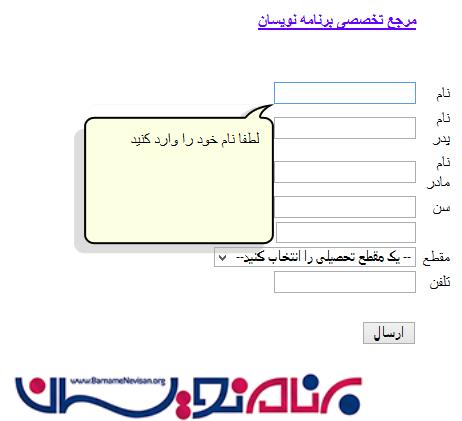
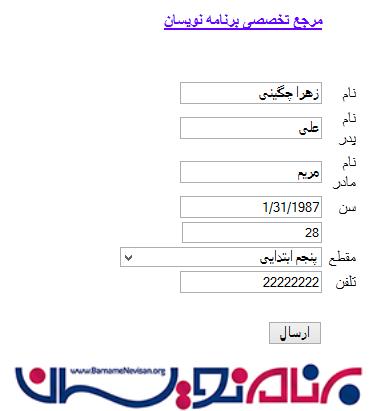
خروجی های موردنظر را ببینید.
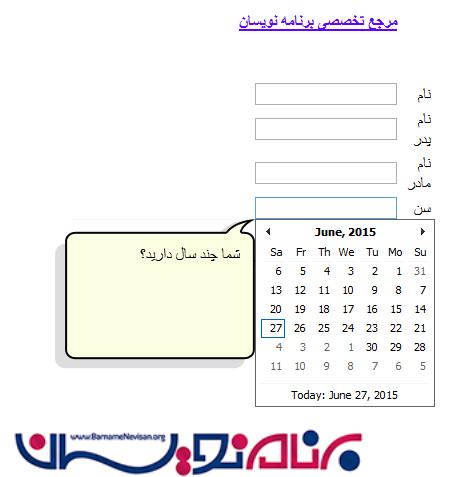
در این قسمت با توجه تاریخ تولدی که وارد کرده اید سن شما را محاسبه می کند.

- ASP.net
- 2k بازدید
- 1 تشکر