
بررسی Data Binding در Net.
دوشنبه 14 اردیبهشت 1394این مقاله به اهمیت data binding در net. اشاره می کند

Data Binding چیست ؟
data binding یک زمینه در Net. میباشد که با کنترلهای مختلف در سمت کاربر امکان نمایش , ویرایش و یا حذف مقادیر موجود در بانک اطلاعاتی(مانند SQL و یا XML) را فعال میسازد .
نسخه های قبلی NET . دسترسی به DataBinding بسیار محدود بود .پس باید برای دسترسی به سیستم مدیریت بانک اطلاعاتی باید غیر مستقیم به بانک اطلاعاتی متصل شویم .
مشکل آدرسی دهی در NET. با استفاده از کنترل های مناسب و نحوه اتصال این کنترل ها در سمت کاربر میباشد .گستزش نرم افزارهای تحت وب به سادگی برای ظرفیت استفاده از کنترل های تحت وب در سمت سرور میباشد .
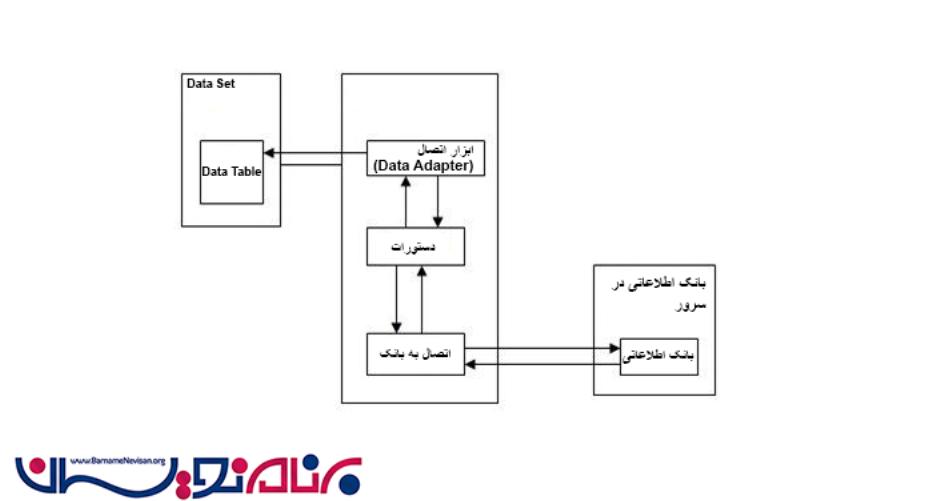
مزایای Data Binding :
1 - کاهش حجم کد نویسی
2 - اجرا و کارایی بهتر از نرم افزار
3 - توسعه سریع برنامه های مبتنی بر داده
4 - خصوصی سازی یا نحوه اتصال بانک به صورت پیش فرض با استفاذه از اصلاح کدهای ضروری
5 - یافتن رویدادهای اتصال کنترلهای مختلف
6 - مشاهده بازخورد از اعتبار سنجی
ِData Binding مربوط به کنترل GridView
    <%@ Page Language="C#" AutoEventWireup="true" CodeFile="Default.aspx.cs" Inherits="BasicGridView" %>

    <!DOCTYPE html PUBLIC "-//W3C//DTD XHTML 1.1//EN" "http://www.w3.org/TR/xhtml11/DTD/xhtml11.dtd">

    <html xmlns="http://www.w3.org/1999/xhtml" >
    <head runat="server">
        <title>Untitled Page</title>
    </head>
    <body>
        <form id="form1" runat="server">
        <div>
            <asp:GridView ID="GridView1" runat="server">
            </asp:GridView>

        </div>
        </form>
    </body>
    </html>
دستورات مربوط به اتصال به بانک اطلاعاتی را میتوانید در این قسمت مشاهده کنید :
    using System;
    using System.Data;
    using System.Configuration;
    using System.Collections;
    using System.Web;
    using System.Web.Security;
    using System.Web.UI;
    using System.Web.UI.WebControls;
    using System.Web.UI.WebControls.WebParts;
    using System.Web.UI.HtmlControls;
    using System.Web.Configuration;
    using System.Data.SqlClient;

    public partial class BasicGridView : System.Web.UI.Page
    {
        protected void Page_Load(object sender, EventArgs e)
        {
            if (!this.IsPostBack)
            {
                string connectionString = WebConfigurationManager.ConnectionStrings["Northwind"].ConnectionString;
                string selectSQL = "SELECT ProductID, ProductName, UnitPrice FROM Products";
                SqlConnection con = new SqlConnection(connectionString);
                SqlCommand cmd = new SqlCommand(selectSQL, con);
                SqlDataAdapter adapter = new SqlDataAdapter(cmd);
                DataSet ds = new DataSet();

                adapter.Fill(ds, "Products");

                GridView1.DataSource = ds;
                GridView1.DataBind();
            }
        }
    }
تگ مربوط به اتصال در پوشه Web.config شامل زیر می باشد :
    <?Xml version="1.0"?>
    <Configuration>
      <ConnectionStrings>
        <Add name="Northwind" connectionString="Data Source=localhost\SQLEXPRESS;Initial Catalog=Northwind;Integrated Security=SSPI"/>
      </connectionStrings>
    </configuration>
روشهای زیر برای استفاده از BindingManager جهت اتصال به بانک اطلاعاتی وجود دارد :
1 - کامپوننت Binding Manager را به ToolBox در اضافه میکنیم .
2 - BindingManager را به Web Form اضافه میکنیم .
3 - در قسمت Designer میتوانیم Data Bind را تنظیم کنیم .
4 - زمانی که شما باید پروژه را اجرا کنیم . برای نمایش اطلاعات از متد BindtoWebForm استفاده میکنیم .
5 - به منظور دریافت اطلاعات از web form , شما باید متد bindFromwebForm را فراخوانی کنید .
protected void UpdateDataBindings()
{
  // create a new collection to store the new bindings found
  DataBindingInfoCollection newBindings = new DataBindingInfoCollection();

  // gets all web controls from the form
  IReferenceService service = (IReferenceService)GetService(
    typeof(IReferenceService));
  object[] references = service.GetReferences(typeof(Control));

  foreach(Control control in references){
    // if the control isn't in the page but it's a naming container, skip it
    if ((control.NamingContainer == null) ||
       (control.NamingContainer.GetType() != typeof(Page))) continue;

    // get the interface related to data binding
    IDataBindingsAccessor dba = (IDataBindingsAccessor)control;

    if (dba.HasDataBindings){
      foreach (DataBinding db in dba.DataBindings){
        // get the binding information for the control
        DataBindingInfo dbi = GetBindingInformation(db, control);

        // if the entry isn't new, set the old values
        UpdateDataBindingInfo(dbi, bindingManager.DataBindings);

        newBindings.Add(dbi);
      }
    }
  }

  // if the data bindings have changed
  if (CheckBindingChanges(bindingManager.DataBindings, newBindings)){
    // notify that the component is going to change
    RaiseComponentChanging(null);

    // update the bindings
    bindingManager.DataBindings.Clear();
    foreach(DataBindingInfo dbi in newBindings){
      bindingManager.DataBindings.Add(dbi);
    }

    // notify that the component has changed
    RaiseComponentChanged(null, null, null);
  }
}

- C#.net
- 5k بازدید
- 1 تشکر