
تغییر رنگ پس زمینه سطرهای کنترل GridView با استفاده از رویداد RowDataBuond در Asp.Net و VB.NET
یکشنبه 9 فروردین 1394در این مقاله نحوه تغییر رنگ پس زمینه سطرهای کنترل GridView به صورت خودکار با استفاده از رویداد RowDataBind در Asp.Net و VB.Net را شرح خواهیم داد
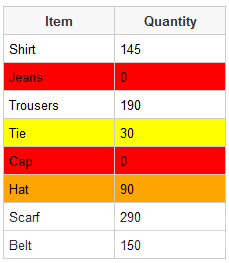
برای تغییر رنگ پس زمینه مراحل زیر را انجام می دهیم :
ابتدا کنترل GridView را به صفحه اضافه می کنیم
<asp:GridView ID="GridView1" CssClass = "Grid" runat="server" AutoGenerateColumns="false" OnRowDataBound = "OnRowDataBound">
    <Columns>
        <asp:BoundField DataField="Item" HeaderText="Item"/>
        <asp:BoundField DataField="Quantity" HeaderText="Quantity"/>
    </Columns>
</asp:GridView>
سپس فضای نامهای ذکر شده در ادامه را در پروژه قرار میدهیم :
کد #C :
using System.Data;
using System.Drawing;
کد VB.NET :
Imports System.Data
Imports System.Drawing
سپس می توانیم یک DataTable ایجاد کرده و کنترل GridView را به آن متصل کنیم :
#C :
protected void Page_Load(object sender, EventArgs e)
{
    if (!IsPostBack)
    {
        DataTable dt = new DataTable();
        dt.Columns.AddRange(new DataColumn[2] { new DataColumn("Item"), new DataColumn("Quantity") });
        dt.Rows.Add("Shirt", 145);
        dt.Rows.Add("Jeans", 0);
        dt.Rows.Add("Trousers", 190);
        dt.Rows.Add("Tie", 30);
        dt.Rows.Add("Cap", 0);
        dt.Rows.Add("Hat", 90);
        dt.Rows.Add("Scarf", 290);
        dt.Rows.Add("Belt", 150);
        GridView1.DataSource = dt;
        GridView1.DataBind();
    }
}
VB.NET :
Protected Sub Page_Load(sender As Object, e As EventArgs) Handles Me.Load
    If Not IsPostBack Then
        Dim dt As New DataTable()
        dt.Columns.AddRange(New DataColumn(1) {New DataColumn("Item"), New DataColumn("Quantity")})
        dt.Rows.Add("Shirt", 145)
        dt.Rows.Add("Jeans", 0)
        dt.Rows.Add("Trousers", 190)
        dt.Rows.Add("Tie", 30)
        dt.Rows.Add("Cap", 0)
        dt.Rows.Add("Hat", 90)
        dt.Rows.Add("Scarf", 290)
        dt.Rows.Add("Belt", 150)
        GridView1.DataSource = dt
        GridView1.DataBind()
    End If
End Sub
در این مثال ما با استفاده از رویداد OnRowDataBound چک میکنیم و برای هر شرط یک رنگ متفاوت در نظر گرفته ایم , به طور مثال اگر مقدار 0 باشد رنگ قرمز , مقدار بین 1 تا 50 باشد رنگ زرد و اگر مقدار 51 تا 100 باشد رنگ نارنجی برای پس زمینه سطر مربوطه در نظر می گیرد .
#C :
protected void OnRowDataBound(object sender, GridViewRowEventArgs e)
{
    if (e.Row.RowType == DataControlRowType.DataRow)
    {
        int quantity = int.Parse(e.Row.Cells[1].Text);

        foreach (TableCell cell in e.Row.Cells)
        {
            if (quantity == 0)
            {
                cell.BackColor = Color.Red;
            }
            if (quantity > 0 && quantity <= 50)
            {
                cell.BackColor = Color.Yellow;
            }
            if (quantity > 50 && quantity <= 100)
            {
                cell.BackColor = Color.Orange;
            }
        }
    }
}
VB.NET :
Protected Sub OnRowDataBound(sender As Object, e As GridViewRowEventArgs)
    If e.Row.RowType = DataControlRowType.DataRow Then
        Dim quantity As Integer = Integer.Parse(e.Row.Cells(1).Text)

        For Each cell As TableCell In e.Row.Cells
            If quantity = 0 Then
                cell.BackColor = Color.Red
            End If
            If quantity > 0 AndAlso quantity <= 50 Then
                cell.BackColor = Color.Yellow
            End If
            If quantity > 50 AndAlso quantity <= 100 Then
                cell.BackColor = Color.Orange
            End If
        Next
    End If
End Sub

- ASP.net
- 3k بازدید
- 3 تشکر