
فرم اسلایدری
پنجشنبه 9 مرداد 1393پلاگین فرم اسلایدری بسیار زیبا برای ثبت کاربر جدید
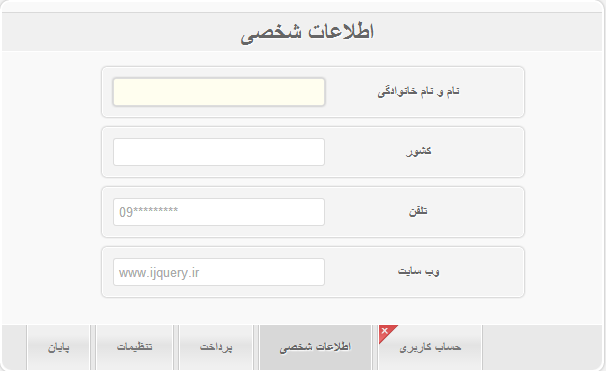
۱- فراخوانی کتابخانه پلاگین و خصوصیت ها
        <link rel="stylesheet" href="css/style.css" type="text/css" media="screen"/>
        <script type="text/javascript" src="http://ajax.googleapis.com/ajax/libs/jquery/1.4.2/jquery.min.js"></script>
        <script type="text/javascript" src="sliding.form.js"></script>
        <link rel="stylesheet" type="text/css" href="css/main.css" />
        <script type="text/javascript">
                $("#username").change({
                    function(){ $("#username").hide();
                }});
        </script>
2- کد html جهت استفاده پلاگین
        <div id="content">
            <div id="wrapper">
                <div id="steps">
                    <form id="formElem" name="formElem" action="" method="post">
                        <fieldset class="step">
                            <legend>حساب کاربری</legend>
                            <p>
                                <label for="username">نام کاربری</label>
                                <input id="username" name="username" />

                            </p>

                        </fieldset>
                        <fieldset class="step">
                            <legend>اطلاعات شخصی</legend>
                            <p>
                                <label for="name">نام و نام خانوادگی</label>
                                <input id="name" name="name" type="text" AUTOCOMPLETE=OFF />
                            </p>
                            <p>
                                <label for="country">کشور</label>
                                <input id="country" name="country" type="text" AUTOCOMPLETE=OFF />
                            </p>
                            <p>
                                <label for="phone">تلفن</label>
                                <input id="phone" name="phone" placeholder="09*********" type="tel" AUTOCOMPLETE=OFF />
                            </p>
                            <p>
                                <label for="website">وب سایت</label>
                                <input id="website" name="website" placeholder="www.ijquery.ir" type="tel" AUTOCOMPLETE=OFF />
                            </p>
                        </fieldset>
                        <fieldset class="step">
                            <legend>پرداخت</legend>
                            <p>
                                <label for="cardtype">بانک</label>
                                <select id="cardtype" name="cardtype">
                                    <option>ملی</option>
                                    <option>ملت</option>
                                    <option>کشاورزی</option>
                                    <option>...</option>
                                </select>
                            </p>
                            <p>
                                <label for="cardnumber">شماره کارت</label>
                                <input id="cardnumber" name="cardnumber" type="number" AUTOCOMPLETE=OFF />
                            </p>
                            <p>
                                <label for="secure">شماره شبا</label>
                                <input id="secure" name="secure" type="number" AUTOCOMPLETE=OFF />
                            </p>
                            <p>
                                <label for="namecard">نام صاحب کارت</label>
                                <input id="namecard" name="namecard" type="text" AUTOCOMPLETE=OFF />
                            </p>
                        </fieldset>
                        <fieldset class="step">
                            <legend>تنظیمات</legend>
                            <p>
                                <label for="newsletter"></label>
                                <select id="newsletter" name="newsletter">
                                    <option value="Daily" selected>Daily</option>
                                    <option value="Weekly">Weekly</option>
                                    <option value="Monthly">Monthly</option>
                                    <option value="Never">Never</option>
                                </select>
                            </p>
                            <p>
                                <label for="updates">Updates</label>
                                <select id="updates" name="updates">
                                    <option value="1" selected>Package 1</option>
                                    <option value="2">Package 2</option>
                                    <option value="0">Don't send updates</option>
                                </select>
                            </p>
                            <p>
                                <label for="tagname">Newsletter Tag</label>
                                <input id="tagname" name="tagname" type="text" AUTOCOMPLETE=OFF />
                            </p>
                        </fieldset>
                        <fieldset class="step">
                            <legend>Confirm</legend>
                            <p>
                                Everything in the form was correctly filled
                                if all the steps have a green checkmark icon.
                                A red checkmark icon indicates that some field
                                is missing or filled out with invalid data. In this
                                last step the user can confirm the submission of
                                the form.
                            </p>
                            <p class="submit">
                                <button id="registerButton" type="submit">Register</button>
                            </p>
                        </fieldset>
                    </form>
                </div>
                <div id="navigation" style="display:none;">
                    <ul>
                        <li class="selected">
                            <a href="#">حساب کاربری</a>
                        </li>
                        <li>
                            <a href="#">اطلاعات شخصی</a>
                        </li>
                        <li>
                            <a href="#">پرداخت</a>
                        </li>
                        <li>
                            <a href="#">تنظیمات</a>
                        </li>
                        <li>
                            <a href="#">پایان</a>
                        </li>
                    </ul>
                </div>
            </div>
        </div>
منبع : شرکت فنی مهندسی ویندا